> ## Documentation Index
> Fetch the complete documentation index at: https://koreai-content-gov.mintlify.site/llms.txt
> Use this file to discover all available pages before exploring further.
# Agent Performance Report
[Back to Reports List](/ai-for-service/analytics/quality-ai/reports/qm-reports-list)
The **Agent Performance Report** provides a consolidated view of agent performance across selected scorecards. It includes channel, contact direction, adherence metrics, coaching assignments, and evaluation trends, enabling performance analysis across inbound and outbound evaluated interactions.
The report includes:
* Scorecard and evaluation scores
* Metric adherence and failure percentage
* Coaching assignments
* Attribute-level performance analysis
* Queue, language, agent, and agent group filtering
* CSV export and scheduled delivery
The report includes only evaluated interactions and agents mapped to the selected scorecards. Aggregated metrics exclude interactions below the configured duration threshold unless they were manually evaluated.
## Generate the Report
1. **Create the Report**
Follow the standard report creation process described in see [Scheduled Reports](/ai-for-service/analytics/quality-ai/reports/scheduled-reports#create-a-report).
2. Select **Agent Performance Report** from the **Report Type** list.
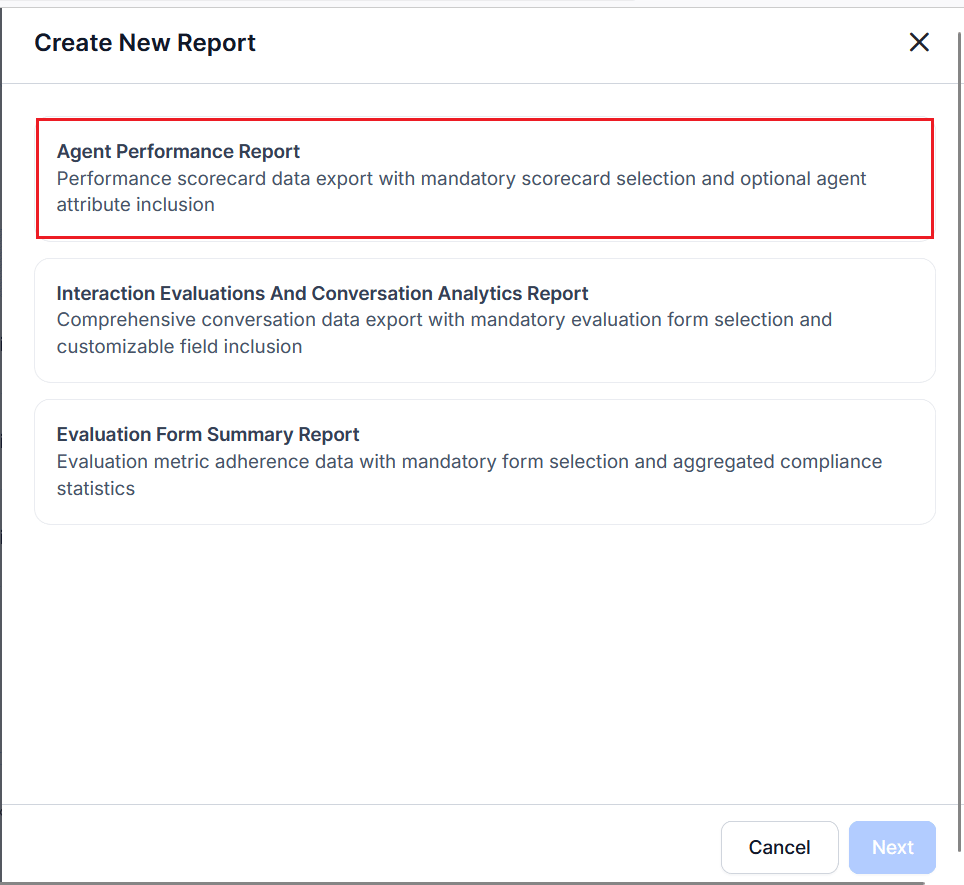 3. Select one or more **Agent Scorecards**. At least one scorecard is required.
4. Select the **Date Range** and **Timezone**.
5. Complete the **Configuration — Filters** section.
6. Select **+ Add Filter** to add one or more filter rows.
7. Select a **Filter Type**, such as: **Channel** (Voice or Chat), **Contact Direction** (Inbound or Outbound), **Queue**, **Language**, **Agents**, **Agent Groups**.
8. Select the appropriate values for each selected filter.
9. Select **Optional Fields** to include additional supported columns (interaction attributes) in the generated CSV.
* Available optional fields depend on the selected scorecard.
* Selected fields are appended as additional columns in the exported CSV.
10. Enter one or more email addresses in the **Send Email to** field to send the automated reports. At least one email address is required.
11. Select **Next**.
12. Complete the **Schedule** section to generate the report using the current configuration.
For information about report configuration, see [Configure Schedule Reports](/ai-for-service/analytics/quality-ai/reports/scheduled-reports#configure-schedule).
***
## Report Fields
### Generated CSV Fields
The report exports agent-level performance details, evaluation summary metrics, scorecard results, coaching information, and attribute-level evaluation performance.
Each row represents a single agent and includes overall scores along with attribute- and metric-level results.
| Field | Description |
| ----------------------------- | ----------------------------------------------------------------------------------------------------------------------------------------------------------------------------------------------------------------------- |
| **Agent Name** | Name of the evaluated agent. |
| **Total Interactions** | Total number of evaluated interactions for the agent. |
| **Kore Evaluation Score** | Overall Quality AI evaluation score calculated for the agent. |
| **Failed Interactions Count** | Number of interactions that failed the evaluation criteria. |
| **Fatal Interactions** | Number of interactions containing fatal metric violations. |
| **Coaching Assignments** | Number of coaching assignments associated with the agent. |
| **Scorecard Score** | Overall score calculated from the configured scorecard. |
| **``** | Name of a scorecard attribute. Examples include **AU update Jan12**, **Agent rude update Jan12 update**, **CU**, **Greet update Jan8**, **Price**, **Resolution update Jan8**, **Voice Jan8 update**, and **sign-off**. |
| **`-Score`** | Overall score calculated for the corresponding scorecard attribute. |
| **``** | Metric performance associated with a scorecard attribute. Metrics are generated dynamically based on the configured scorecard. |
### Example Metrics
The following are examples of dynamically generated metric fields:
| Metric | Description |
| ----------------------------------------------------------------------------------------------- | ------------------------------------------------------------------------------------------ |
| **AU update Jan12 - COMMON AU** - GEN & DET | Evaluates agent understanding using Generative AI and deterministic evaluation criteria. |
| **AU update Jan12 - COMMON CU** - GEN Both | Evaluates customer understanding using Generative AI-based criteria. |
| **Agent rude update Jan12 update - Agent Blaming Customer** | Evaluates whether the agent avoids inappropriately blaming the customer. |
| **Agent rude update Jan12 update - Agent Maintain Professionalism** | Evaluates whether the agent maintains professional communication standards. |
| **Greet update Jan8 - COMMON Greeting Compliance Rate** | Evaluates whether the agent follows the required greeting guidelines. |
| **Price - COMMON Pricing** | Evaluates how well the agent handles pricing-related customer queries. |
| **Resolution update Jan8 - COMMON Resolution Compliance - Confirmation of Resolution Provided** | Evaluates whether the agent confirms and communicates resolution completion appropriately. |
| **Voice Jan8 update - Speech Crosstalk Update** | Evaluates overlapping speech or interruptions during the interaction. |
| **Voice Jan8 update - Speech Dead Air** | Evaluates periods of silence or inactivity during the interaction. |
| **Voice Jan8 update - Speech Rate Violation** | Evaluates whether the agent's speaking rate meets configured standards. |
| **sign-off - COMMON Proper Sign-off** | Evaluates whether the agent follows the required closing and sign-off guidelines. |
Attribute and metric fields are generated dynamically based on the configured scorecard. Each attribute includes an overall attribute score followed by the individual metric results associated with that attribute.
***
### View and Download the Report
For information about viewing, downloading, managing reports, and adding, editing, or removing filters, see [Manage Reports](/ai-for-service/analytics/quality-ai/reports/scheduled-reports#manage-reports).
Reports are exported in [CSV format](https://raw.githubusercontent.com/Koredotcom/docs-v2/refs/heads/main/ai-for-service/assets/agent-report.csv).
***
3. Select one or more **Agent Scorecards**. At least one scorecard is required.
4. Select the **Date Range** and **Timezone**.
5. Complete the **Configuration — Filters** section.
6. Select **+ Add Filter** to add one or more filter rows.
7. Select a **Filter Type**, such as: **Channel** (Voice or Chat), **Contact Direction** (Inbound or Outbound), **Queue**, **Language**, **Agents**, **Agent Groups**.
8. Select the appropriate values for each selected filter.
9. Select **Optional Fields** to include additional supported columns (interaction attributes) in the generated CSV.
* Available optional fields depend on the selected scorecard.
* Selected fields are appended as additional columns in the exported CSV.
10. Enter one or more email addresses in the **Send Email to** field to send the automated reports. At least one email address is required.
11. Select **Next**.
12. Complete the **Schedule** section to generate the report using the current configuration.
For information about report configuration, see [Configure Schedule Reports](/ai-for-service/analytics/quality-ai/reports/scheduled-reports#configure-schedule).
***
## Report Fields
### Generated CSV Fields
The report exports agent-level performance details, evaluation summary metrics, scorecard results, coaching information, and attribute-level evaluation performance.
Each row represents a single agent and includes overall scores along with attribute- and metric-level results.
| Field | Description |
| ----------------------------- | ----------------------------------------------------------------------------------------------------------------------------------------------------------------------------------------------------------------------- |
| **Agent Name** | Name of the evaluated agent. |
| **Total Interactions** | Total number of evaluated interactions for the agent. |
| **Kore Evaluation Score** | Overall Quality AI evaluation score calculated for the agent. |
| **Failed Interactions Count** | Number of interactions that failed the evaluation criteria. |
| **Fatal Interactions** | Number of interactions containing fatal metric violations. |
| **Coaching Assignments** | Number of coaching assignments associated with the agent. |
| **Scorecard Score** | Overall score calculated from the configured scorecard. |
| **``** | Name of a scorecard attribute. Examples include **AU update Jan12**, **Agent rude update Jan12 update**, **CU**, **Greet update Jan8**, **Price**, **Resolution update Jan8**, **Voice Jan8 update**, and **sign-off**. |
| **`-Score`** | Overall score calculated for the corresponding scorecard attribute. |
| **``** | Metric performance associated with a scorecard attribute. Metrics are generated dynamically based on the configured scorecard. |
### Example Metrics
The following are examples of dynamically generated metric fields:
| Metric | Description |
| ----------------------------------------------------------------------------------------------- | ------------------------------------------------------------------------------------------ |
| **AU update Jan12 - COMMON AU** - GEN & DET | Evaluates agent understanding using Generative AI and deterministic evaluation criteria. |
| **AU update Jan12 - COMMON CU** - GEN Both | Evaluates customer understanding using Generative AI-based criteria. |
| **Agent rude update Jan12 update - Agent Blaming Customer** | Evaluates whether the agent avoids inappropriately blaming the customer. |
| **Agent rude update Jan12 update - Agent Maintain Professionalism** | Evaluates whether the agent maintains professional communication standards. |
| **Greet update Jan8 - COMMON Greeting Compliance Rate** | Evaluates whether the agent follows the required greeting guidelines. |
| **Price - COMMON Pricing** | Evaluates how well the agent handles pricing-related customer queries. |
| **Resolution update Jan8 - COMMON Resolution Compliance - Confirmation of Resolution Provided** | Evaluates whether the agent confirms and communicates resolution completion appropriately. |
| **Voice Jan8 update - Speech Crosstalk Update** | Evaluates overlapping speech or interruptions during the interaction. |
| **Voice Jan8 update - Speech Dead Air** | Evaluates periods of silence or inactivity during the interaction. |
| **Voice Jan8 update - Speech Rate Violation** | Evaluates whether the agent's speaking rate meets configured standards. |
| **sign-off - COMMON Proper Sign-off** | Evaluates whether the agent follows the required closing and sign-off guidelines. |
Attribute and metric fields are generated dynamically based on the configured scorecard. Each attribute includes an overall attribute score followed by the individual metric results associated with that attribute.
***
### View and Download the Report
For information about viewing, downloading, managing reports, and adding, editing, or removing filters, see [Manage Reports](/ai-for-service/analytics/quality-ai/reports/scheduled-reports#manage-reports).
Reports are exported in [CSV format](https://raw.githubusercontent.com/Koredotcom/docs-v2/refs/heads/main/ai-for-service/assets/agent-report.csv).
***