> ## Documentation Index
> Fetch the complete documentation index at: https://koreai-content-gov.mintlify.site/llms.txt
> Use this file to discover all available pages before exploring further.
# Interaction Evaluation and Conversation Analytics Report
[Back to Reports List](/ai-for-service/analytics/quality-ai/reports/qm-reports-list)
The Interaction Evaluation & Conversation Analytics Report provides interaction-level insights for quality evaluation and business analysis. It exports data from selected evaluation forms, including interaction metadata, evaluation outcomes, sentiment analysis, detected topics (with hierarchy where available), conversation intelligence insights, manual audit details, AI-generated justifications (when available), business metadata, metric-level results, and configurable standard, optional, and custom fields.
Supervisors can filter reports by channel, queue, flow, language, agents, agent groups, contact direction, and duration status. Exports include processed conversations by default, with an option to include pending, unprocessed, and validation-failed conversations. Optional and custom fields are added dynamically as CSV columns based on the selected evaluation forms, configuration, available data, and date range.
## Generate the Report
1. **Create the New Report**.
Follow the standard report creation process described in see [Scheduled Reports](/ai-for-service/analytics/quality-ai/reports/scheduled-reports#create-a-report).
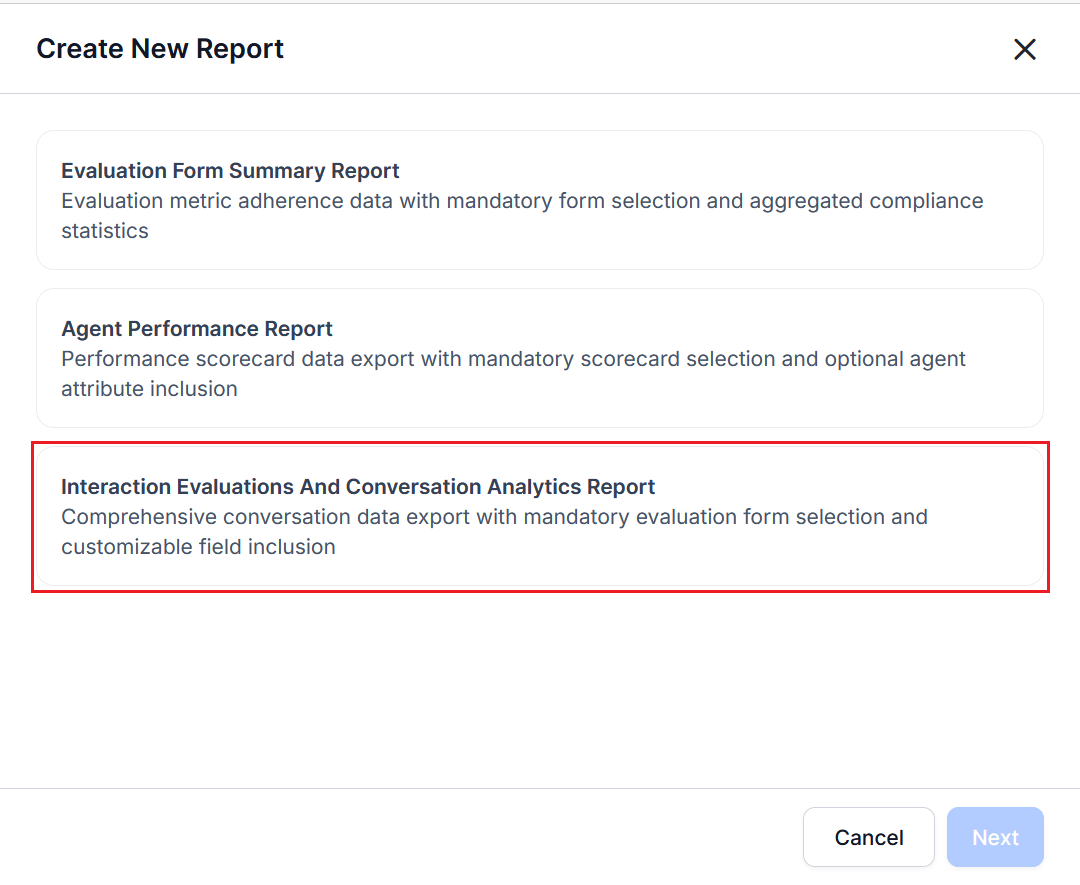
2. Select **Interaction Evaluations and Conversation Analytics Report** from the **Report Type** list.
 3. Select one or more **Evaluation Forms**. Only interactions evaluated using the selected forms are included.
4. Select the **Date Range** and **Timezone**.
5. Complete the **Configuration — Filters** section.
6. Select **+ Add Filter** to add one or more filter rows.
7. Configure **Standard Filters**, such as: **Channel** (Voice or Chat), **Contact Direction** (Inbound or Outbound), **Queue**, **Language**, **Agents**, **Agent Groups**, **Duration Status**.
8. Configure selected filter values as required.
* When using a flow-based evaluation form, the **Flow** filter displays only associated Experience Flows.
9. Configure **Custom Filters** using organization-specific fields, such as: `AccountID`, `AccountStatus`, `AccountStatusID`, `ActionID`, `ActionName`.
10. Configure **Optional Fields** to include additional metrics or attributes in the report export. This includes two tabs:
* **Standard Optional Fields**: Predefined system-defined (evaluation scores, sentiment, duration, topics, and conversation intelligence metrics) and ready-to-use for consistent reporting.
* **Custom Optional Fields**: Organization-defined (from CRM integrations, APIs, AI Agent metadata) and adds business-specific context, such as `Account ID`, `Status ID`, `Flow Name` (when applicable).
11. Enter one or more email addresses in the **Send Email to** field to send the automated reports. At least one email address is required.
12. Select **Next**.
13. Complete the **Schedule** section to generate the report using the current configuration.
AI Justifications are available only for **Gen AI by Question** metrics. These explanations appear in this report and are also available through supported APIs.
For information about report configuration, see [Configure Schedule Reports](/ai-for-service/analytics/quality-ai/reports/scheduled-reports#configure-schedule).
The report returns all interactions matching the selected filters. Use the **Duration Status** filter to limit results by evaluation eligibility. Interactions ingested before duration threshold support may contain a `null` value for `duration_status`.
## Processing Status Options
The following options determine whether pending or validation-failed conversations are included in exported reports.
| Option | Description |
| ----------------------------------------------------------------- | -------------------------------------------------------------------------------------------------------------------------------------------------------- |
| **Include pending conversations** (disabled by default) | Exports conversation metadata for pending conversations. Evaluation scores and Conversation Intelligence fields remain empty until processing completes. |
| **Include validation-failed conversations** (disabled by default) | Exports conversation metadata together with the validation failure reason. |
The exported report includes a **Processing Status** column with one of the mentioned values: Processed, Pending, or Validation Failed. For validation failures, the report also includes the associated validation failure reason.
***
# Report Behavior
The report behaves as follows:
* AI Justifications are available only for **Gen AI by Question** metrics.
* Custom fields depend on the selected date range and available data.
* Only selected optional and custom fields are included in the CSV export.
* By default, all interactions matching the selected filters are exported.
* Use **Duration Status** to filter interactions by: **Evaluated**, **Below Threshold**, **Duration Unavailable**.
* For interactions ingested before duration threshold support, the `duration_status` field returns `null`.
* Contact Direction displays **Inbound**, **Outbound**, or **All Directions**, when available.
* Flow-based evaluation forms export Experience Flow conversations together with flow-specific evaluation details.
* **Not Applicable Scoring Treatment** indicates whether a non-applicable metric was excluded from scoring or awarded full weight during evaluation.
***
## Report Fields
### Generated CSV Fields
The report exports interaction-level details, evaluation results, conversation insights, and metric-level evaluation data.
| Field | Description |
| ---------------------------------------------------- | ------------------------------------------------------------------------------------------------------------------------------------------------------------------------------ |
| **Conversation ID** | Unique identifier assigned to the interaction. |
| **Channel** | Communication channel used for the interaction, such as Voice or Chat. |
| **Queues** | Queues associated with the interaction. |
| **Last Queue** | Final queue that handled the interaction. |
| **Language** | Configured or detected interaction language. |
| **Agents** | Agents associated with the interaction. |
| **Scored Agent** | Agent whose performance is evaluated. |
| **Start Time** | Date and time when the interaction started. |
| **Sentiment Score** | Sentiment score generated from conversation analysis. |
| **Topics** | Detected conversation topics (L1, L2, and L3 where available). |
| **Escalation** | Indicates whether the interaction was escalated. |
| **Kore Evaluation Score** | Overall Quality AI evaluation score. |
| **Is Passed** | Indicates whether the interaction passed evaluation. |
| **Is Fatal Interaction** | Indicates whether the interaction contains a fatal metric violation. |
| **Audit Score** | Manual audit evaluation score. |
| **Not Applicable Scoring Treatment** | Indicates whether Not Applicable metrics are excluded from the score or awarded full weightage (Exclude from Score or Award Full Weightage) for this interaction's evaluation. |
| **Contact Direction** | Inbound, Outbound, or All Directions. |
| **Duration Status** | Indicates whether the interaction met duration requirements for evaluation. |
| **Evaluation Form** | Evaluation form used for the interaction. |
| **Call Transfer Update** | Result of the Call Transfer metric. |
| **Manual Evaluation UK1 - Manual Evaluation Metric** | Result of the manually evaluated UK1 metric. |
| **Playbook UK** | Result of the Playbook UK metric. |
| **Speech Crosstalk Update** | Detects overlapping speech during voice interactions. |
| **Speech Dead Air** | Detects excessive silence during voice interactions. |
| **Speech Rate Violation** | Evaluates whether the speaking rate meets configured standards. |
| `` | Evaluation result for the configured quality metric. |
| ` - Is Fatal Metric` | Indicates whether the metric is configured as fatal (`1 = Yes`, `0 = No`). |
| ` - Adherence Weight` | Weight assigned to the metric during score calculation. |
| ` - Violation` | Indicates whether the interaction violated the metric (`1 = Violation`, `0 = No Violation`, `NA = Not Applicable`). |
| ` - AI Justification` | AI-generated explanation supporting the metric result, when available. |
| ` - Trigger Justification` | Explanation of the detected trigger or condition that produced the metric result. |
***
### Metric-Level Evaluation Fields
When metric-level details are included, the report exports one row for each evaluated metric associated with an interaction.
| Field | Description |
| --------------------------------- | -------------------------------------------------------------------------- |
| **Metric Name** | Name of the evaluation metric. |
| **Is Fatal Metric** | Indicates whether the metric is configured as fatal (`1 = Yes`, `0 = No`). |
| **Total Interactions** | Total number of interactions evaluated for the metric. |
| **Total Applicable Interactions** | Number of interactions in which the metric was applicable. |
| **Total Adhered Interactions** | Number of applicable interactions meeting the evaluation criteria. |
| **Metric Adherence %** | Percentage of applicable interactions that adhered to the metric. |
Metric-level fields are generated dynamically based on the selected evaluation form. Each configured metric includes its evaluation result together with related attributes such as fatal metric status, adherence weight, and violation status.
Supported metrics may include: Standard quality metrics, AI-based metrics, Deterministic metrics, Manual evaluation metrics, Voice quality metrics, Organization-specific custom metrics.
AI Justification and Trigger Justification fields are included only for supported metrics.
***
### View and Download the Report
For information about viewing, downloading, managing reports, and adding, editing, or removing filters, see [Manage Reports](/ai-for-service/analytics/quality-ai/reports/scheduled-reports#manage-reports).
Reports are exported in [CSV format](https://raw.githubusercontent.com/Koredotcom/docs-v2/refs/heads/main/ai-for-service/assets/ie-report.csv).
***
3. Select one or more **Evaluation Forms**. Only interactions evaluated using the selected forms are included.
4. Select the **Date Range** and **Timezone**.
5. Complete the **Configuration — Filters** section.
6. Select **+ Add Filter** to add one or more filter rows.
7. Configure **Standard Filters**, such as: **Channel** (Voice or Chat), **Contact Direction** (Inbound or Outbound), **Queue**, **Language**, **Agents**, **Agent Groups**, **Duration Status**.
8. Configure selected filter values as required.
* When using a flow-based evaluation form, the **Flow** filter displays only associated Experience Flows.
9. Configure **Custom Filters** using organization-specific fields, such as: `AccountID`, `AccountStatus`, `AccountStatusID`, `ActionID`, `ActionName`.
10. Configure **Optional Fields** to include additional metrics or attributes in the report export. This includes two tabs:
* **Standard Optional Fields**: Predefined system-defined (evaluation scores, sentiment, duration, topics, and conversation intelligence metrics) and ready-to-use for consistent reporting.
* **Custom Optional Fields**: Organization-defined (from CRM integrations, APIs, AI Agent metadata) and adds business-specific context, such as `Account ID`, `Status ID`, `Flow Name` (when applicable).
11. Enter one or more email addresses in the **Send Email to** field to send the automated reports. At least one email address is required.
12. Select **Next**.
13. Complete the **Schedule** section to generate the report using the current configuration.
AI Justifications are available only for **Gen AI by Question** metrics. These explanations appear in this report and are also available through supported APIs.
For information about report configuration, see [Configure Schedule Reports](/ai-for-service/analytics/quality-ai/reports/scheduled-reports#configure-schedule).
The report returns all interactions matching the selected filters. Use the **Duration Status** filter to limit results by evaluation eligibility. Interactions ingested before duration threshold support may contain a `null` value for `duration_status`.
## Processing Status Options
The following options determine whether pending or validation-failed conversations are included in exported reports.
| Option | Description |
| ----------------------------------------------------------------- | -------------------------------------------------------------------------------------------------------------------------------------------------------- |
| **Include pending conversations** (disabled by default) | Exports conversation metadata for pending conversations. Evaluation scores and Conversation Intelligence fields remain empty until processing completes. |
| **Include validation-failed conversations** (disabled by default) | Exports conversation metadata together with the validation failure reason. |
The exported report includes a **Processing Status** column with one of the mentioned values: Processed, Pending, or Validation Failed. For validation failures, the report also includes the associated validation failure reason.
***
# Report Behavior
The report behaves as follows:
* AI Justifications are available only for **Gen AI by Question** metrics.
* Custom fields depend on the selected date range and available data.
* Only selected optional and custom fields are included in the CSV export.
* By default, all interactions matching the selected filters are exported.
* Use **Duration Status** to filter interactions by: **Evaluated**, **Below Threshold**, **Duration Unavailable**.
* For interactions ingested before duration threshold support, the `duration_status` field returns `null`.
* Contact Direction displays **Inbound**, **Outbound**, or **All Directions**, when available.
* Flow-based evaluation forms export Experience Flow conversations together with flow-specific evaluation details.
* **Not Applicable Scoring Treatment** indicates whether a non-applicable metric was excluded from scoring or awarded full weight during evaluation.
***
## Report Fields
### Generated CSV Fields
The report exports interaction-level details, evaluation results, conversation insights, and metric-level evaluation data.
| Field | Description |
| ---------------------------------------------------- | ------------------------------------------------------------------------------------------------------------------------------------------------------------------------------ |
| **Conversation ID** | Unique identifier assigned to the interaction. |
| **Channel** | Communication channel used for the interaction, such as Voice or Chat. |
| **Queues** | Queues associated with the interaction. |
| **Last Queue** | Final queue that handled the interaction. |
| **Language** | Configured or detected interaction language. |
| **Agents** | Agents associated with the interaction. |
| **Scored Agent** | Agent whose performance is evaluated. |
| **Start Time** | Date and time when the interaction started. |
| **Sentiment Score** | Sentiment score generated from conversation analysis. |
| **Topics** | Detected conversation topics (L1, L2, and L3 where available). |
| **Escalation** | Indicates whether the interaction was escalated. |
| **Kore Evaluation Score** | Overall Quality AI evaluation score. |
| **Is Passed** | Indicates whether the interaction passed evaluation. |
| **Is Fatal Interaction** | Indicates whether the interaction contains a fatal metric violation. |
| **Audit Score** | Manual audit evaluation score. |
| **Not Applicable Scoring Treatment** | Indicates whether Not Applicable metrics are excluded from the score or awarded full weightage (Exclude from Score or Award Full Weightage) for this interaction's evaluation. |
| **Contact Direction** | Inbound, Outbound, or All Directions. |
| **Duration Status** | Indicates whether the interaction met duration requirements for evaluation. |
| **Evaluation Form** | Evaluation form used for the interaction. |
| **Call Transfer Update** | Result of the Call Transfer metric. |
| **Manual Evaluation UK1 - Manual Evaluation Metric** | Result of the manually evaluated UK1 metric. |
| **Playbook UK** | Result of the Playbook UK metric. |
| **Speech Crosstalk Update** | Detects overlapping speech during voice interactions. |
| **Speech Dead Air** | Detects excessive silence during voice interactions. |
| **Speech Rate Violation** | Evaluates whether the speaking rate meets configured standards. |
| `` | Evaluation result for the configured quality metric. |
| ` - Is Fatal Metric` | Indicates whether the metric is configured as fatal (`1 = Yes`, `0 = No`). |
| ` - Adherence Weight` | Weight assigned to the metric during score calculation. |
| ` - Violation` | Indicates whether the interaction violated the metric (`1 = Violation`, `0 = No Violation`, `NA = Not Applicable`). |
| ` - AI Justification` | AI-generated explanation supporting the metric result, when available. |
| ` - Trigger Justification` | Explanation of the detected trigger or condition that produced the metric result. |
***
### Metric-Level Evaluation Fields
When metric-level details are included, the report exports one row for each evaluated metric associated with an interaction.
| Field | Description |
| --------------------------------- | -------------------------------------------------------------------------- |
| **Metric Name** | Name of the evaluation metric. |
| **Is Fatal Metric** | Indicates whether the metric is configured as fatal (`1 = Yes`, `0 = No`). |
| **Total Interactions** | Total number of interactions evaluated for the metric. |
| **Total Applicable Interactions** | Number of interactions in which the metric was applicable. |
| **Total Adhered Interactions** | Number of applicable interactions meeting the evaluation criteria. |
| **Metric Adherence %** | Percentage of applicable interactions that adhered to the metric. |
Metric-level fields are generated dynamically based on the selected evaluation form. Each configured metric includes its evaluation result together with related attributes such as fatal metric status, adherence weight, and violation status.
Supported metrics may include: Standard quality metrics, AI-based metrics, Deterministic metrics, Manual evaluation metrics, Voice quality metrics, Organization-specific custom metrics.
AI Justification and Trigger Justification fields are included only for supported metrics.
***
### View and Download the Report
For information about viewing, downloading, managing reports, and adding, editing, or removing filters, see [Manage Reports](/ai-for-service/analytics/quality-ai/reports/scheduled-reports#manage-reports).
Reports are exported in [CSV format](https://raw.githubusercontent.com/Koredotcom/docs-v2/refs/heads/main/ai-for-service/assets/ie-report.csv).
***