> ## Documentation Index
> Fetch the complete documentation index at: https://koreai-content-gov.mintlify.site/llms.txt
> Use this file to discover all available pages before exploring further.
# Using the HubSpot Action Templates
[Back to Actions Integrations](/ai-for-service/integrations/overview#actions)
Use prebuilt HubSpot action templates to auto-create dialog tasks for managing deals and contacts.
**Prerequisites:** Configure [HubSpot](/ai-for-service/integrations/actions/configuring-the-hubspot-action) and [install templates](/ai-for-service/integrations/actions/configuring-the-hubspot-action#step-2-install-the-hubspot-action-templates).
To access dialog tasks: Go to **Automation AI** > **Use Cases** > **Dialogs** and click the auto-created dialog. The canvas opens with all required entity nodes, service nodes, and message scripts.
***
## Supported Actions
| Task | Description | Method |
| ------------------------- | ----------------------------- | ------ |
| Create a Deal | Creates a new deal. | POST |
| Get Deal by Id | Retrieves deal details. | GET |
| Update a Deal | Updates deal details. | PATCH |
| List all Deals | Retrieves all deals. | GET |
| Search Deal by Keyword | Searches deals by keyword. | GET |
| Delete Deal | Deletes a deal. | DELETE |
| Create a Contact | Creates a new contact. | POST |
| Get Contact by Id | Retrieves contact details. | GET |
| List All Contacts | Retrieves all contacts. | GET |
| Update a Contact | Updates contact details. | PATCH |
| Search Contact by Keyword | Searches contacts by keyword. | GET |
| Delete a Contact | Deletes a contact. | DELETE |
***
### Create a Deal
1. Install the template from [HubSpot Action Templates](/ai-for-service/integrations/actions/configuring-the-hubspot-action#step-2-install-the-hubspot-action-templates).
2. The **Create a Deal** dialog task is added with the following components:
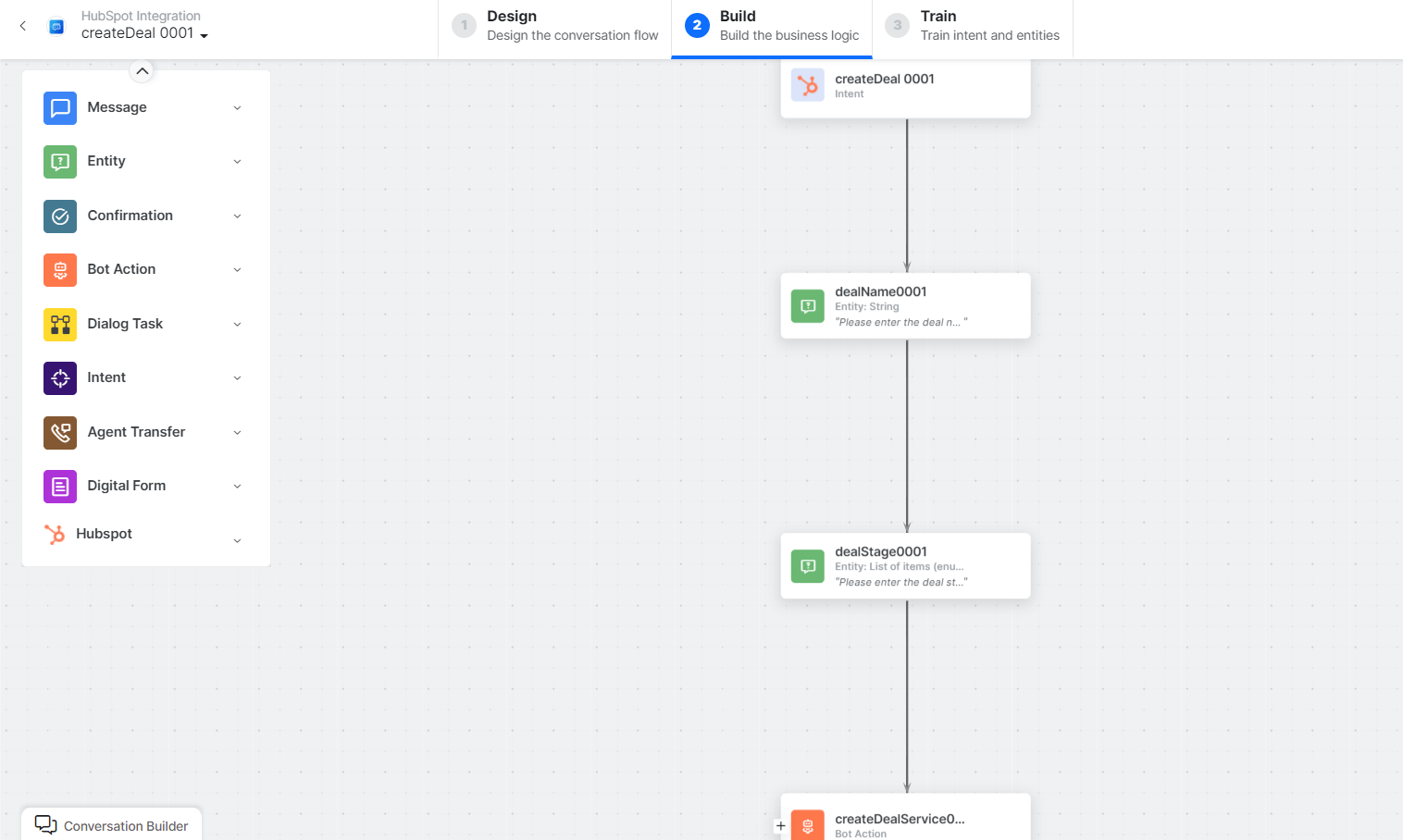 * **createDeal** - User intent to create a deal.
* **dealName**, **dealStage** - Entity nodes for deal details.
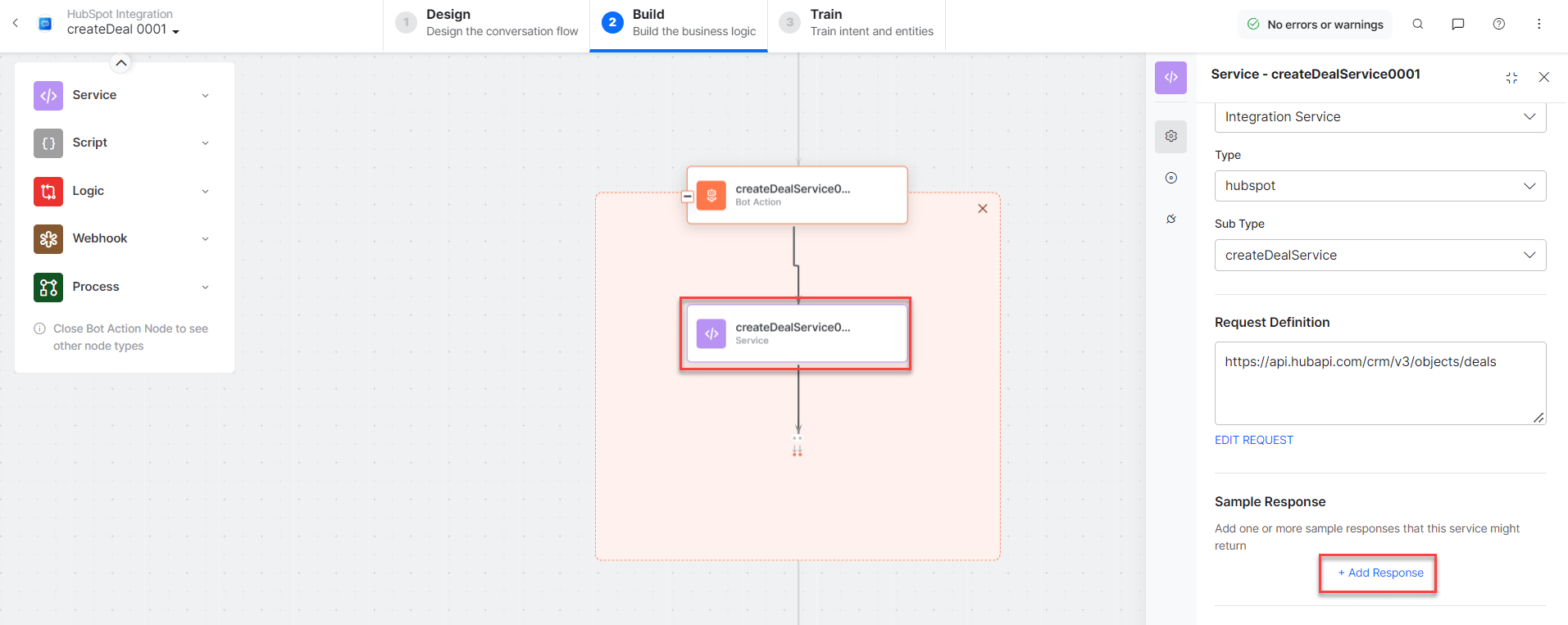
* **createDealService** - Bot action service to create a deal. Click **+** to expand and click **Edit Request** to modify parameters.
* **createDeal** - User intent to create a deal.
* **dealName**, **dealStage** - Entity nodes for deal details.
* **createDealService** - Bot action service to create a deal. Click **+** to expand and click **Edit Request** to modify parameters.
 **Sample Request:**
```json theme={null}
{
"properties": {
"dealname": "Custom data integrations",
"dealstage": "presentationscheduled",
"pipeline": "default"
}
}
```
Click **+Add Response** to add responses:
**Sample Request:**
```json theme={null}
{
"properties": {
"dealname": "Custom data integrations",
"dealstage": "presentationscheduled",
"pipeline": "default"
}
}
```
Click **+Add Response** to add responses:
 **Sample Response:**
```json theme={null}
{
"id": "10146264661",
"properties": {
"createdate": "2022-09-11T10:06:55.570Z",
"dealname": "Integrations",
"dealstage": "presentationscheduled",
"pipeline": "default"
},
"createdAt": "2022-09-11T10:06:55.570Z",
"updatedAt": "2022-09-11T10:06:55.570Z",
"archived": false
}
```
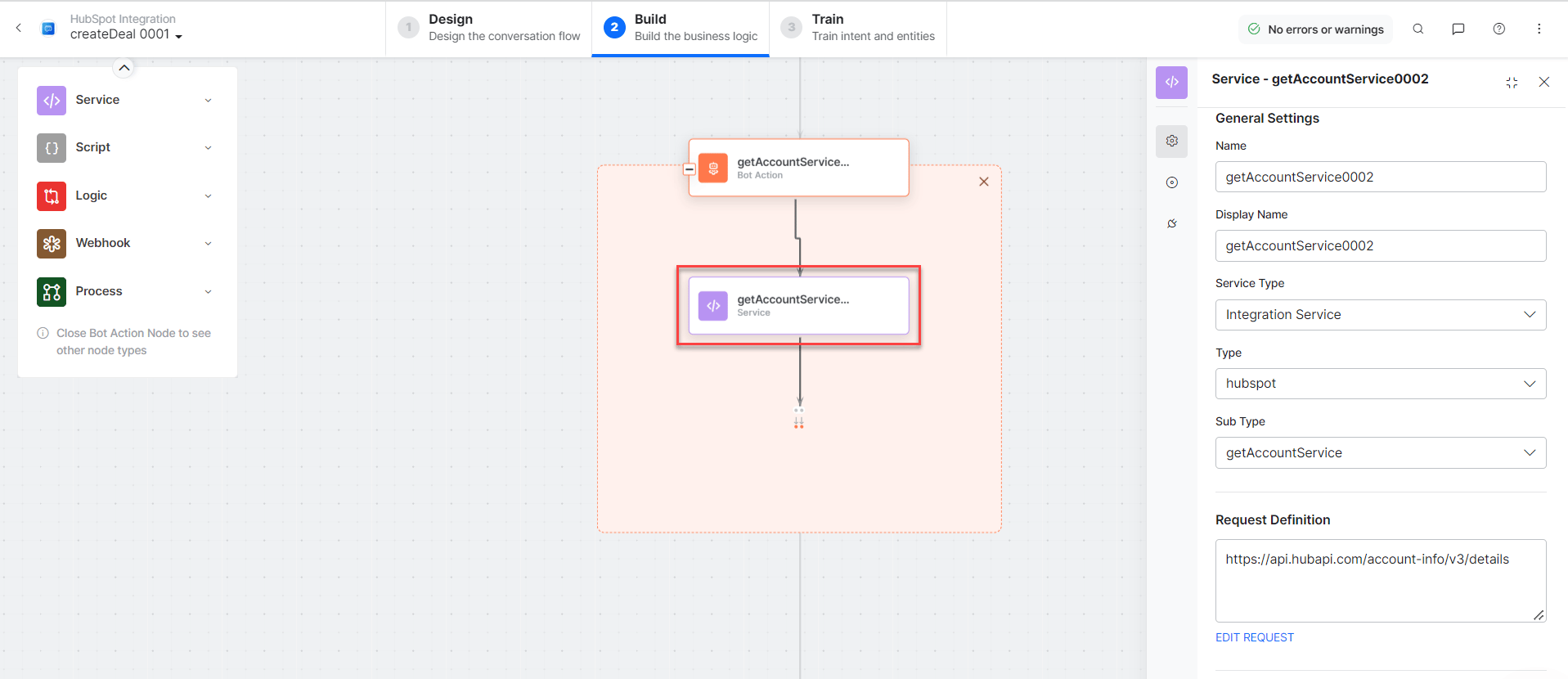
* **getAccountService** - Bot action service to get account details.
**Sample Response:**
```json theme={null}
{
"id": "10146264661",
"properties": {
"createdate": "2022-09-11T10:06:55.570Z",
"dealname": "Integrations",
"dealstage": "presentationscheduled",
"pipeline": "default"
},
"createdAt": "2022-09-11T10:06:55.570Z",
"updatedAt": "2022-09-11T10:06:55.570Z",
"archived": false
}
```
* **getAccountService** - Bot action service to get account details.
 * **createDealMessage** - Message node to display responses.
3. Click **Train** to complete dialog task training.
4. Click **Talk to Bot** to test and debug.
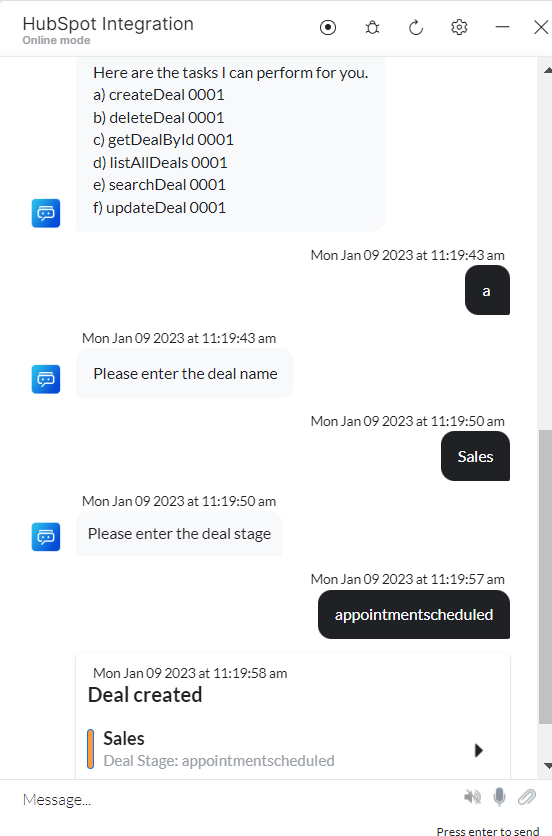
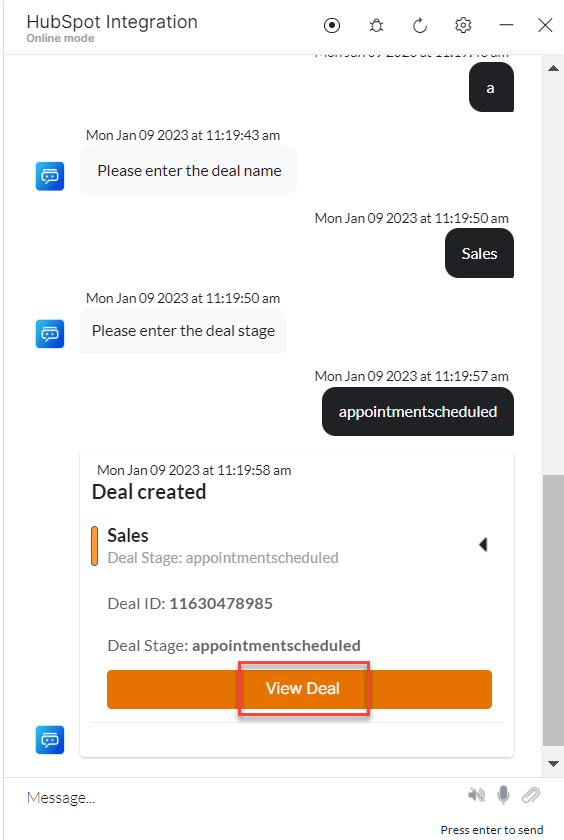
5. Follow prompts to create a deal:
* **createDealMessage** - Message node to display responses.
3. Click **Train** to complete dialog task training.
4. Click **Talk to Bot** to test and debug.
5. Follow prompts to create a deal:
 6. The new deal is created in HubSpot:
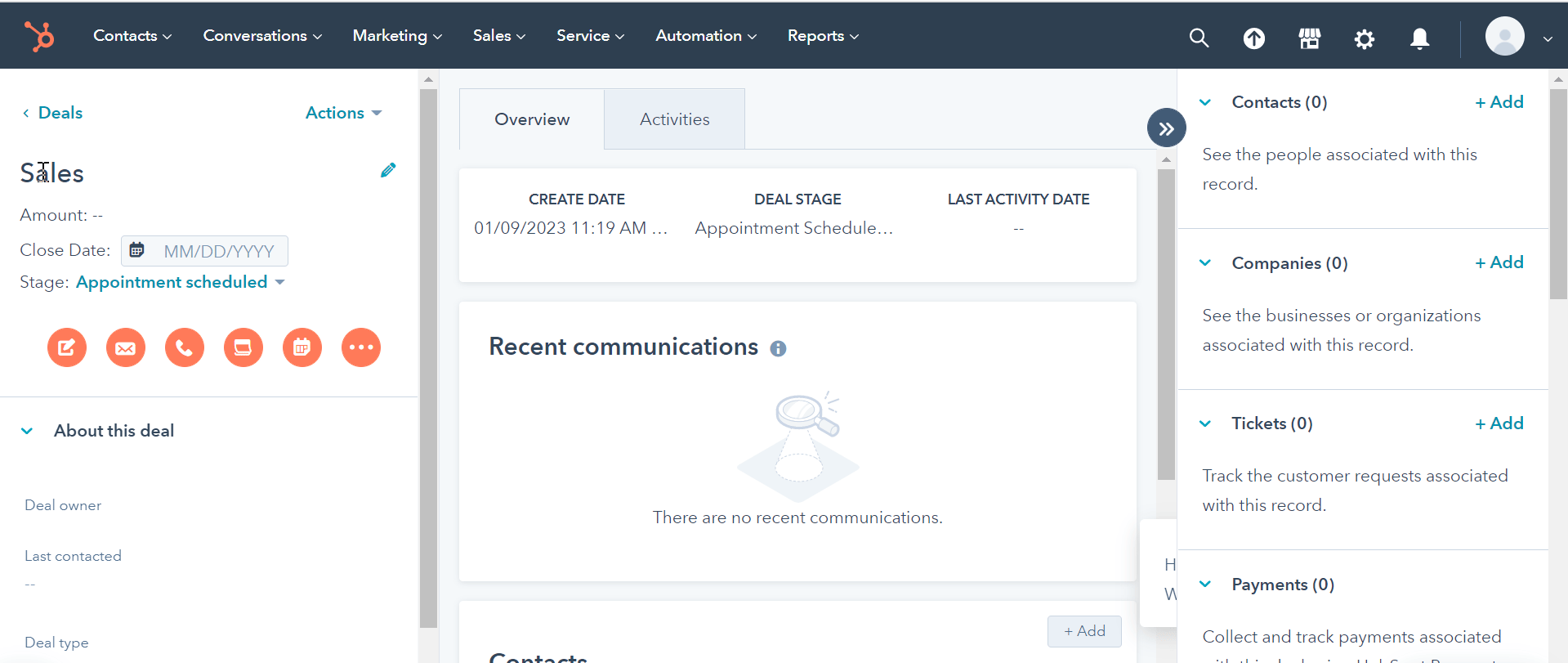
 7. Click **View Deal** to see deal details in HubSpot:
 ***
### Get a Deal by ID
1. Install the template from [HubSpot Action Templates](/ai-for-service/integrations/actions/configuring-the-hubspot-action#step-2-install-the-hubspot-action-templates).
2. The **Get Deal by Id** dialog task is added with the following components:
***
### Get a Deal by ID
1. Install the template from [HubSpot Action Templates](/ai-for-service/integrations/actions/configuring-the-hubspot-action#step-2-install-the-hubspot-action-templates).
2. The **Get Deal by Id** dialog task is added with the following components:
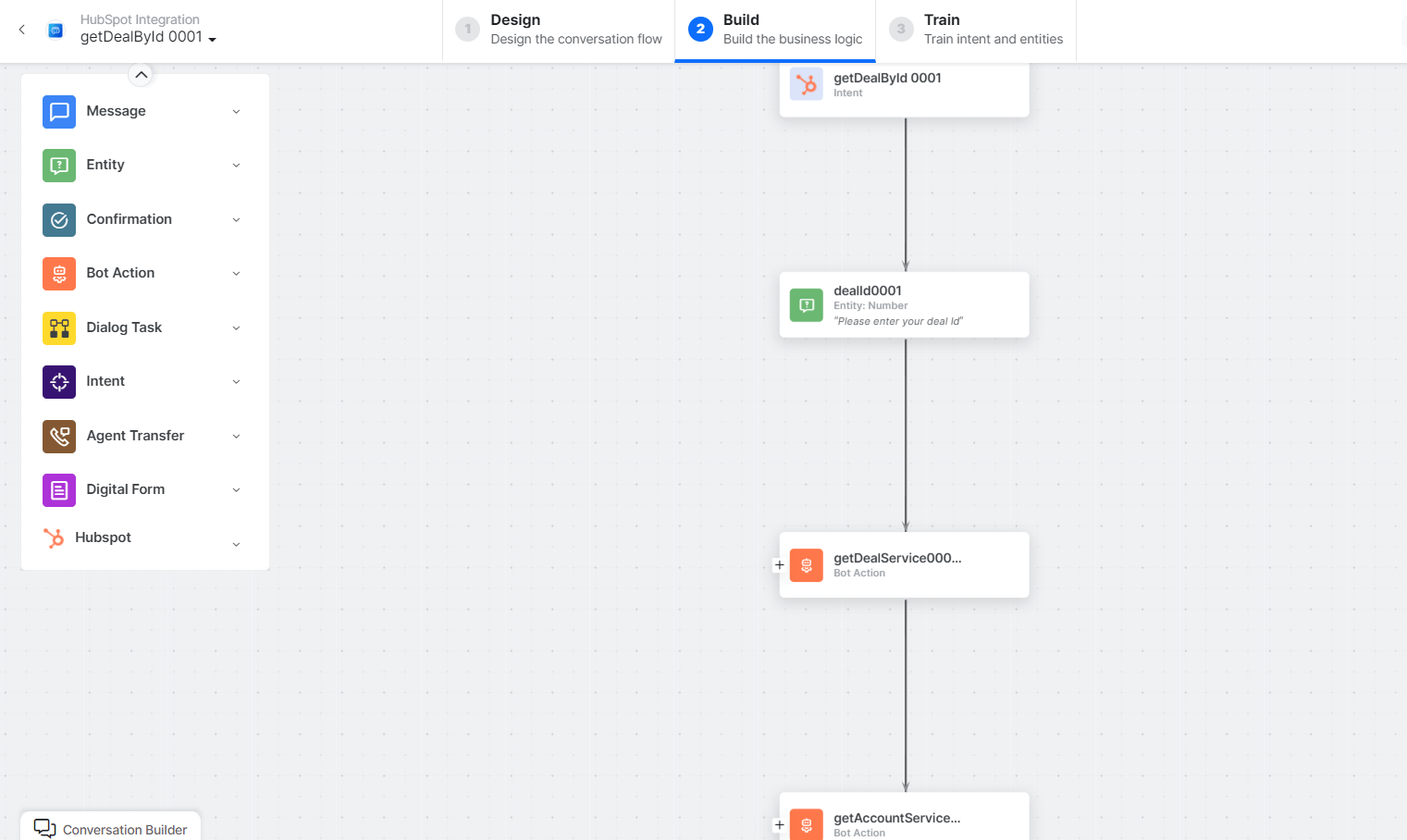 * **getDeal by Id** - User intent to get a deal by ID.
* **dealID** - Entity node for entering the deal ID.
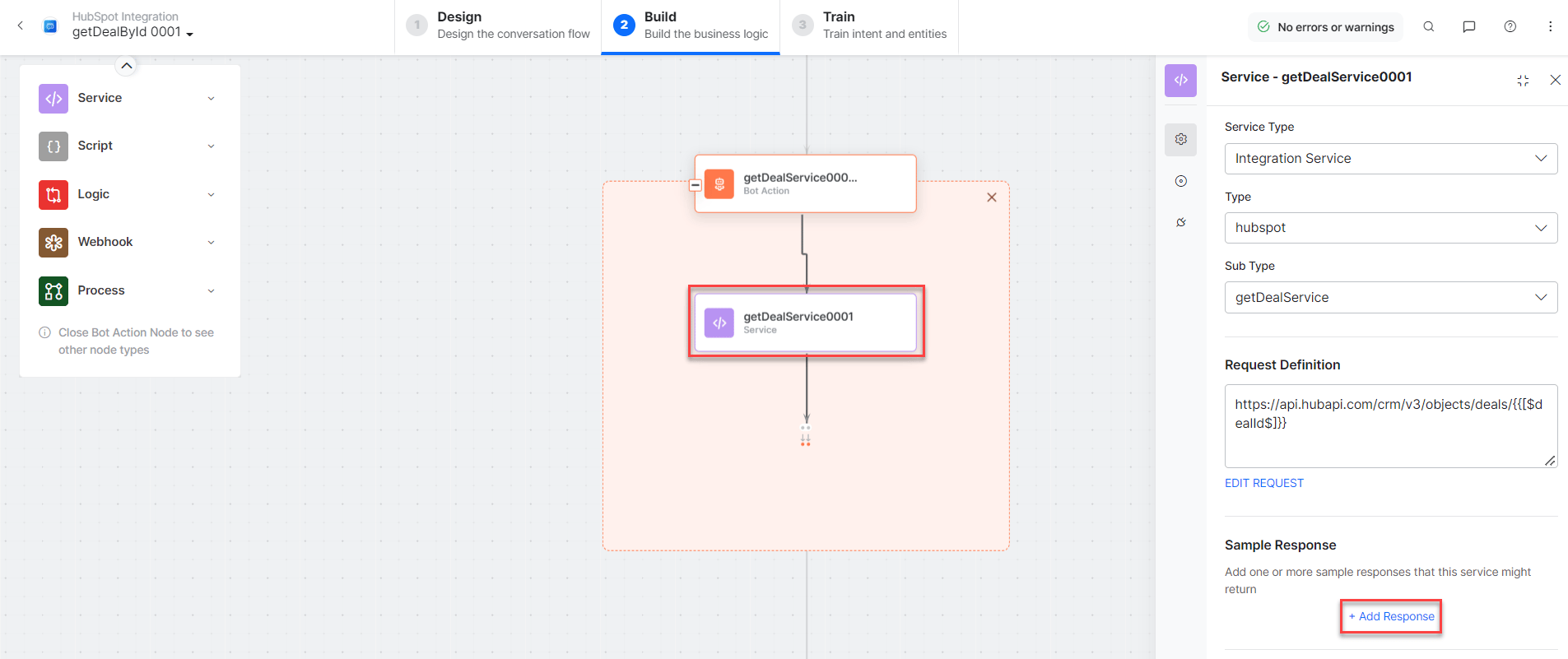
* **getDealService** - Bot action service to fetch deal. Click **+Add Response**:
* **getDeal by Id** - User intent to get a deal by ID.
* **dealID** - Entity node for entering the deal ID.
* **getDealService** - Bot action service to fetch deal. Click **+Add Response**:
 **Sample Response:**
```json theme={null}
{
"id": "10099894869",
"properties": {
"dealname": "Nike deal",
"dealstage": "appointmentscheduled",
"pipeline": "default"
},
"createdAt": "2022-09-07T13:52:04.184Z",
"updatedAt": "2022-09-10T14:13:05.712Z",
"archived": false
}
```
* **getAccountService** - Bot action service to get account details.
* **getDealMessage** - Message node to display responses.
3. Click **Train**, then **Talk to Bot** to test:
**Sample Response:**
```json theme={null}
{
"id": "10099894869",
"properties": {
"dealname": "Nike deal",
"dealstage": "appointmentscheduled",
"pipeline": "default"
},
"createdAt": "2022-09-07T13:52:04.184Z",
"updatedAt": "2022-09-10T14:13:05.712Z",
"archived": false
}
```
* **getAccountService** - Bot action service to get account details.
* **getDealMessage** - Message node to display responses.
3. Click **Train**, then **Talk to Bot** to test:
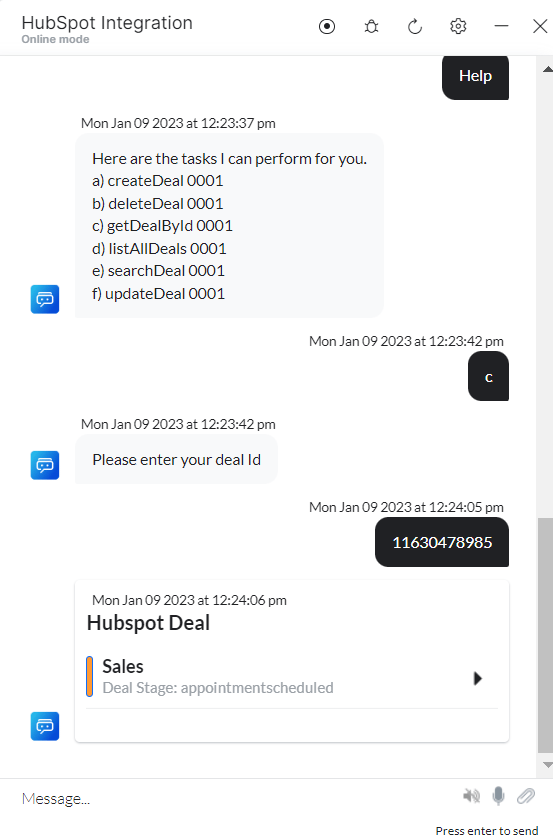 4. Click **View Deal** to see deal details.
***
### List All Deals
1. Install the template from [HubSpot Action Templates](/ai-for-service/integrations/actions/configuring-the-hubspot-action#step-2-install-the-hubspot-action-templates).
2. The **List All Deals** dialog task is added with the following components:
4. Click **View Deal** to see deal details.
***
### List All Deals
1. Install the template from [HubSpot Action Templates](/ai-for-service/integrations/actions/configuring-the-hubspot-action#step-2-install-the-hubspot-action-templates).
2. The **List All Deals** dialog task is added with the following components:
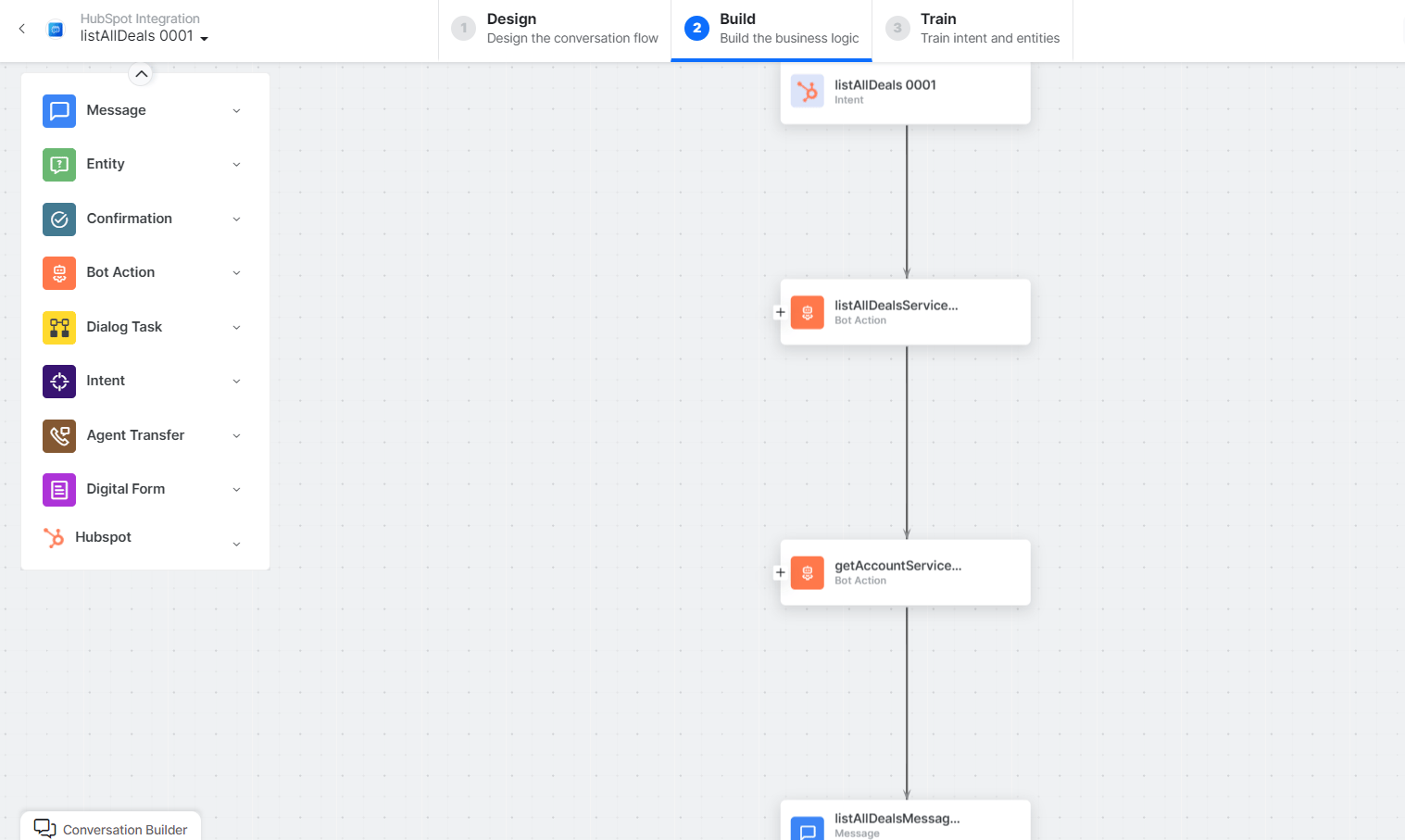 * **List All Deals** - User intent to list all deals.
* **listAllDealsService** - Bot action script to view all deals. Click **+Add Response**:
* **List All Deals** - User intent to list all deals.
* **listAllDealsService** - Bot action script to view all deals. Click **+Add Response**:
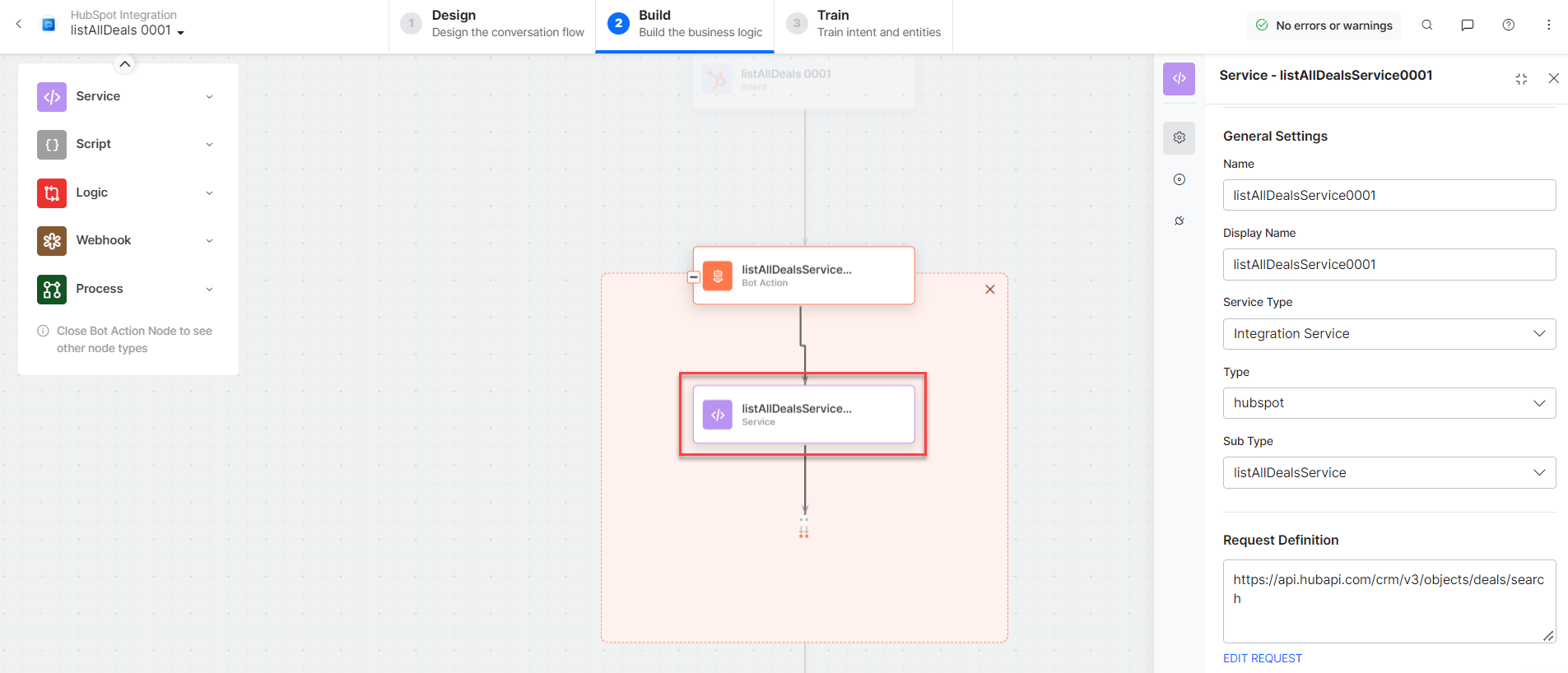 **Sample Response:** (truncated for brevity)
```json theme={null}
{
"total": 7,
"results": [
{
"id": "10274255383",
"properties": {
"dealname": "Adidas deal",
"dealstage": "qualifiedtobuy",
"pipeline": "default"
},
"createdAt": "2022-09-22T07:23:17.500Z",
"archived": false
}
]
}
```
* **getAccountService** - Bot action service to get account details.
* **listAllDealsMessage** - Message node to display responses.
3. Click **Train**, then **Talk to Bot** to test and follow prompts.
***
### Update a Deal
1. Install the template from [HubSpot Action Templates](/ai-for-service/integrations/actions/configuring-the-hubspot-action#step-2-install-the-hubspot-action-templates).
2. The **Update a Deal** dialog task is added with the following components:
**Sample Response:** (truncated for brevity)
```json theme={null}
{
"total": 7,
"results": [
{
"id": "10274255383",
"properties": {
"dealname": "Adidas deal",
"dealstage": "qualifiedtobuy",
"pipeline": "default"
},
"createdAt": "2022-09-22T07:23:17.500Z",
"archived": false
}
]
}
```
* **getAccountService** - Bot action service to get account details.
* **listAllDealsMessage** - Message node to display responses.
3. Click **Train**, then **Talk to Bot** to test and follow prompts.
***
### Update a Deal
1. Install the template from [HubSpot Action Templates](/ai-for-service/integrations/actions/configuring-the-hubspot-action#step-2-install-the-hubspot-action-templates).
2. The **Update a Deal** dialog task is added with the following components:
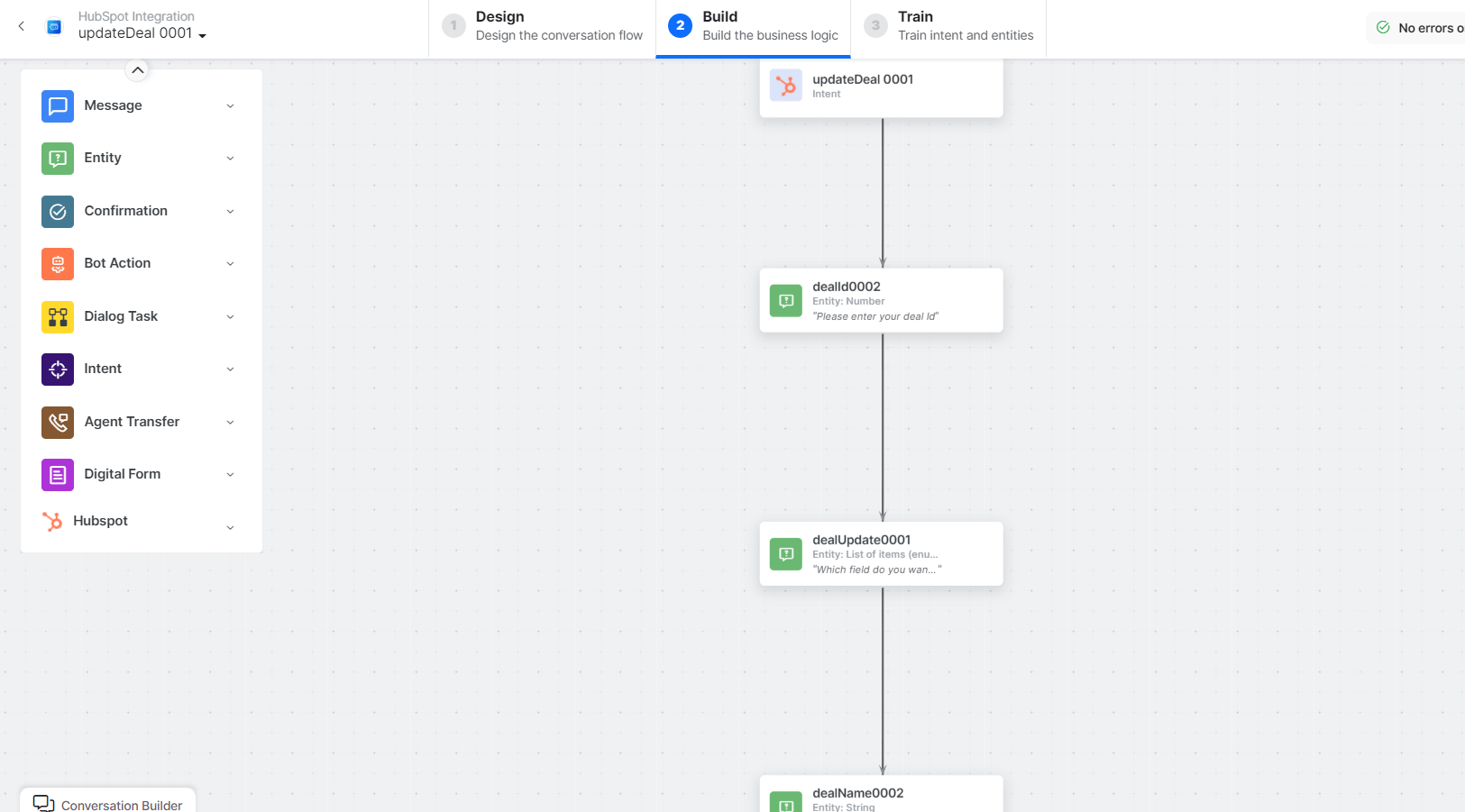 * **Update a Deal** - User intent to update a deal.
* **dealId**, **dealUpdate**, **dealName**, **dealStage** - Entity nodes for updating deal details.
* **updateDealScript** - Bot action script to update a deal.
* **updateDealService** - Bot action service to update a deal:
* **Update a Deal** - User intent to update a deal.
* **dealId**, **dealUpdate**, **dealName**, **dealStage** - Entity nodes for updating deal details.
* **updateDealScript** - Bot action script to update a deal.
* **updateDealService** - Bot action service to update a deal:
 **Sample Request:**
```json theme={null}
{
"properties": {
"dealname": "Adidas Deal",
"dealstage": "closedwon"
}
}
```
Click **+Add Response**:
**Sample Request:**
```json theme={null}
{
"properties": {
"dealname": "Adidas Deal",
"dealstage": "closedwon"
}
}
```
Click **+Add Response**:
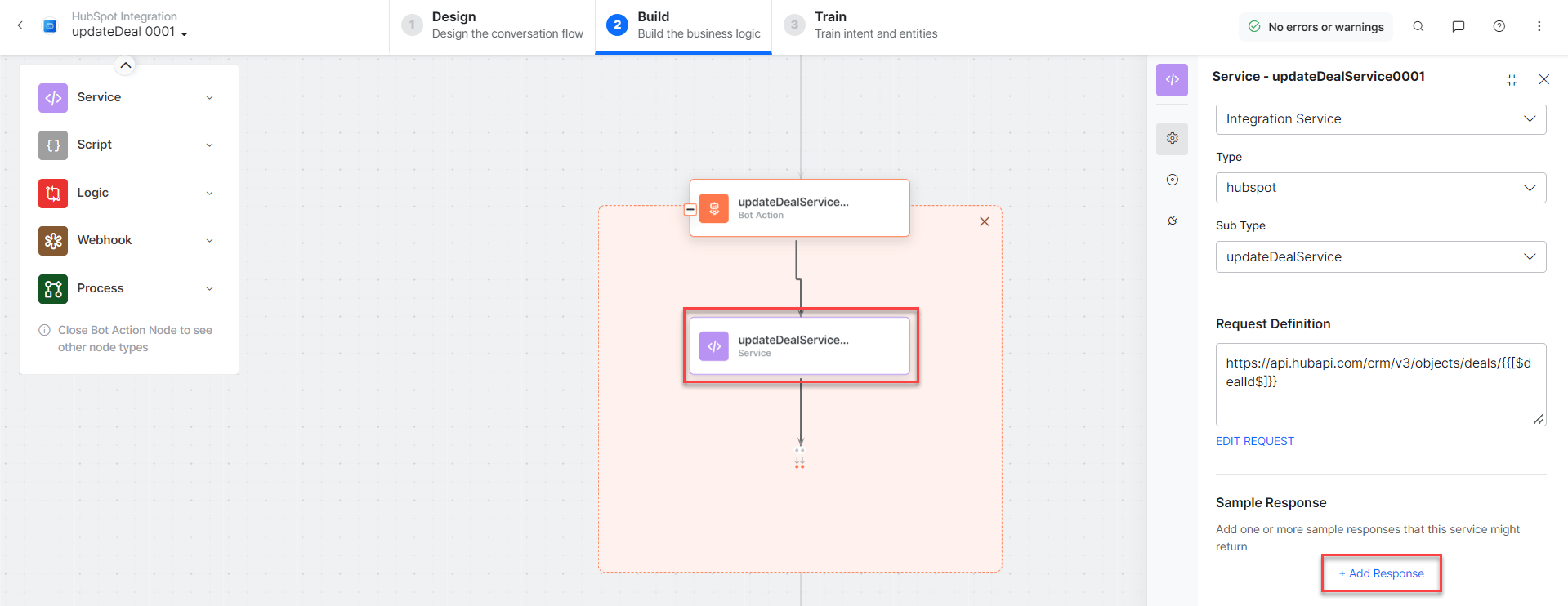 **Sample Response:**
```json theme={null}
{
"id": "10123889765",
"properties": {
"dealname": "Adidas Deal",
"dealstage": "closedwon",
"pipeline": "default"
},
"createdAt": "2022-09-09T06:45:26.228Z",
"updatedAt": "2022-09-11T10:54:30.961Z",
"archived": false
}
```
* **getAccountService**, **getDealService** - Bot action services.
* **updateDealMessage** - Message node to display responses.
3. Click **Train**, then **Talk to Bot** to test:
**Sample Response:**
```json theme={null}
{
"id": "10123889765",
"properties": {
"dealname": "Adidas Deal",
"dealstage": "closedwon",
"pipeline": "default"
},
"createdAt": "2022-09-09T06:45:26.228Z",
"updatedAt": "2022-09-11T10:54:30.961Z",
"archived": false
}
```
* **getAccountService**, **getDealService** - Bot action services.
* **updateDealMessage** - Message node to display responses.
3. Click **Train**, then **Talk to Bot** to test:
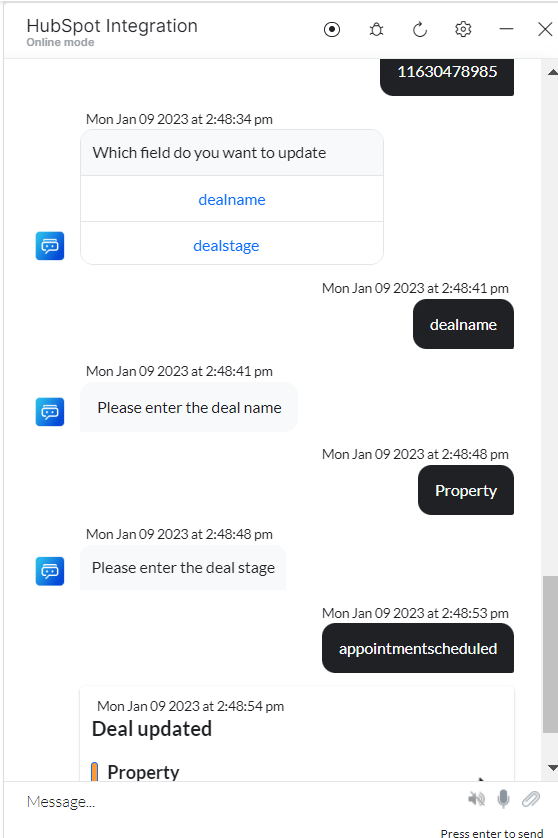 4. Enter all deal details when prompted. The deal is updated in HubSpot:
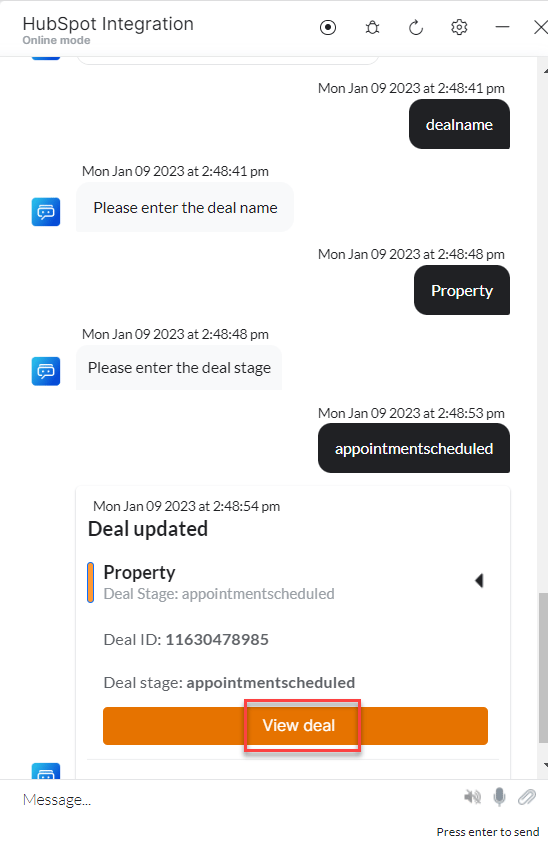 5. Click **View Deal** to see updated details.
***
### Search Deal by Keyword
1. Install the template from [HubSpot Action Templates](/ai-for-service/integrations/actions/configuring-the-hubspot-action#step-2-install-the-hubspot-action-templates).
2. The **Search Deal by Keyword** dialog task is added with the following components:
5. Click **View Deal** to see updated details.
***
### Search Deal by Keyword
1. Install the template from [HubSpot Action Templates](/ai-for-service/integrations/actions/configuring-the-hubspot-action#step-2-install-the-hubspot-action-templates).
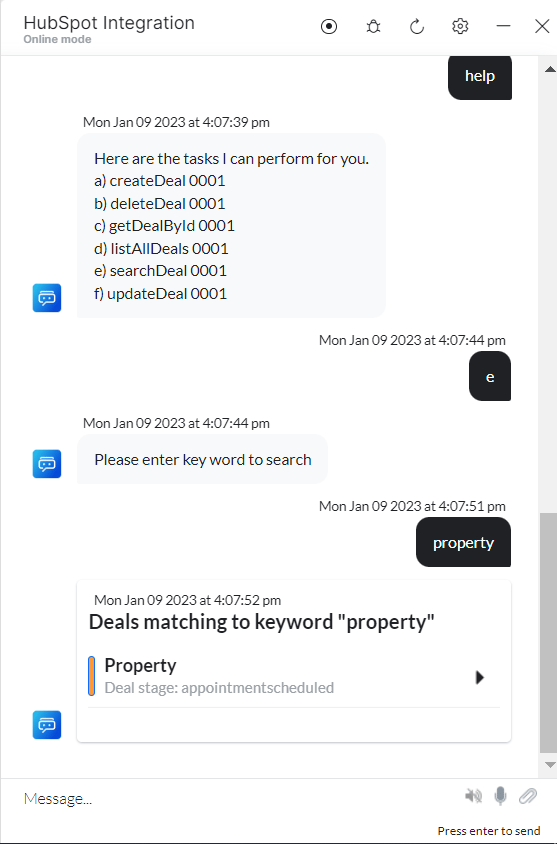
2. The **Search Deal by Keyword** dialog task is added with the following components:
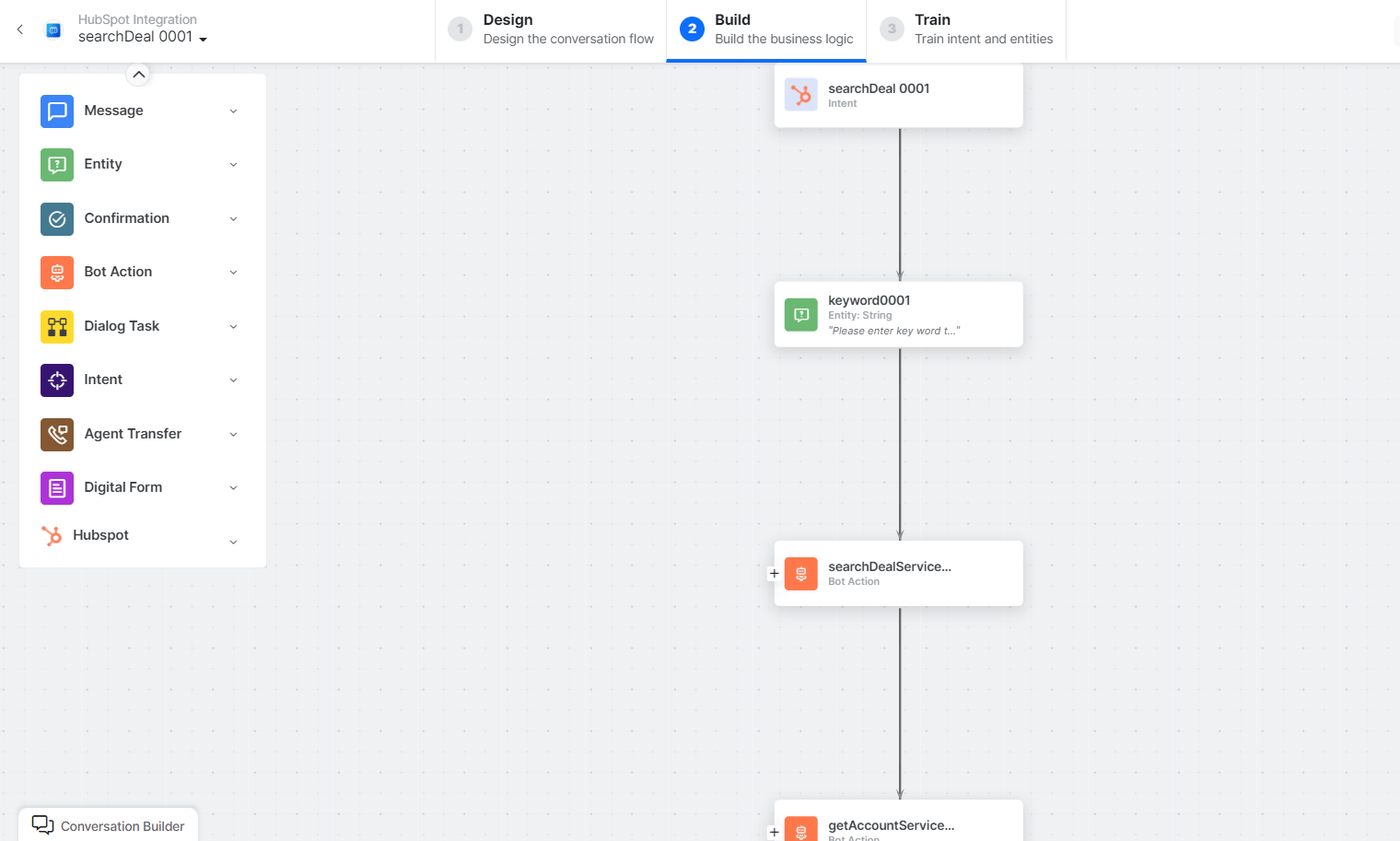 * **Search Deal** - User intent to search a deal.
* **Keyword** - Entity node for search keywords.
* **searchDealService** - Bot action script to search deals:
* **Search Deal** - User intent to search a deal.
* **Keyword** - Entity node for search keywords.
* **searchDealService** - Bot action script to search deals:
 **Sample Request:**
```json theme={null}
{
"sorts": [{"propertyName": "createdate", "direction": "DESCENDING"}],
"query": "abac"
}
```
**Sample Response:** (truncated)
```json theme={null}
{
"total": 3,
"results": [
{
"id": "10274255383",
"properties": {
"dealname": "Adidas deal",
"dealstage": "qualifiedtobuy"
},
"archived": false
}
]
}
```
* **getAccountService** - Bot action service to get account details.
* **searchDealMessage** - Message node to display responses.
3. Click **Train**, then **Talk to Bot** to test:
**Sample Request:**
```json theme={null}
{
"sorts": [{"propertyName": "createdate", "direction": "DESCENDING"}],
"query": "abac"
}
```
**Sample Response:** (truncated)
```json theme={null}
{
"total": 3,
"results": [
{
"id": "10274255383",
"properties": {
"dealname": "Adidas deal",
"dealstage": "qualifiedtobuy"
},
"archived": false
}
]
}
```
* **getAccountService** - Bot action service to get account details.
* **searchDealMessage** - Message node to display responses.
3. Click **Train**, then **Talk to Bot** to test:
 ***
### Delete a Deal
1. Install the template from [HubSpot Action Templates](/ai-for-service/integrations/actions/configuring-the-hubspot-action#step-2-install-the-hubspot-action-templates).
2. The **Delete Deal** dialog task is added with the following components:
***
### Delete a Deal
1. Install the template from [HubSpot Action Templates](/ai-for-service/integrations/actions/configuring-the-hubspot-action#step-2-install-the-hubspot-action-templates).
2. The **Delete Deal** dialog task is added with the following components:
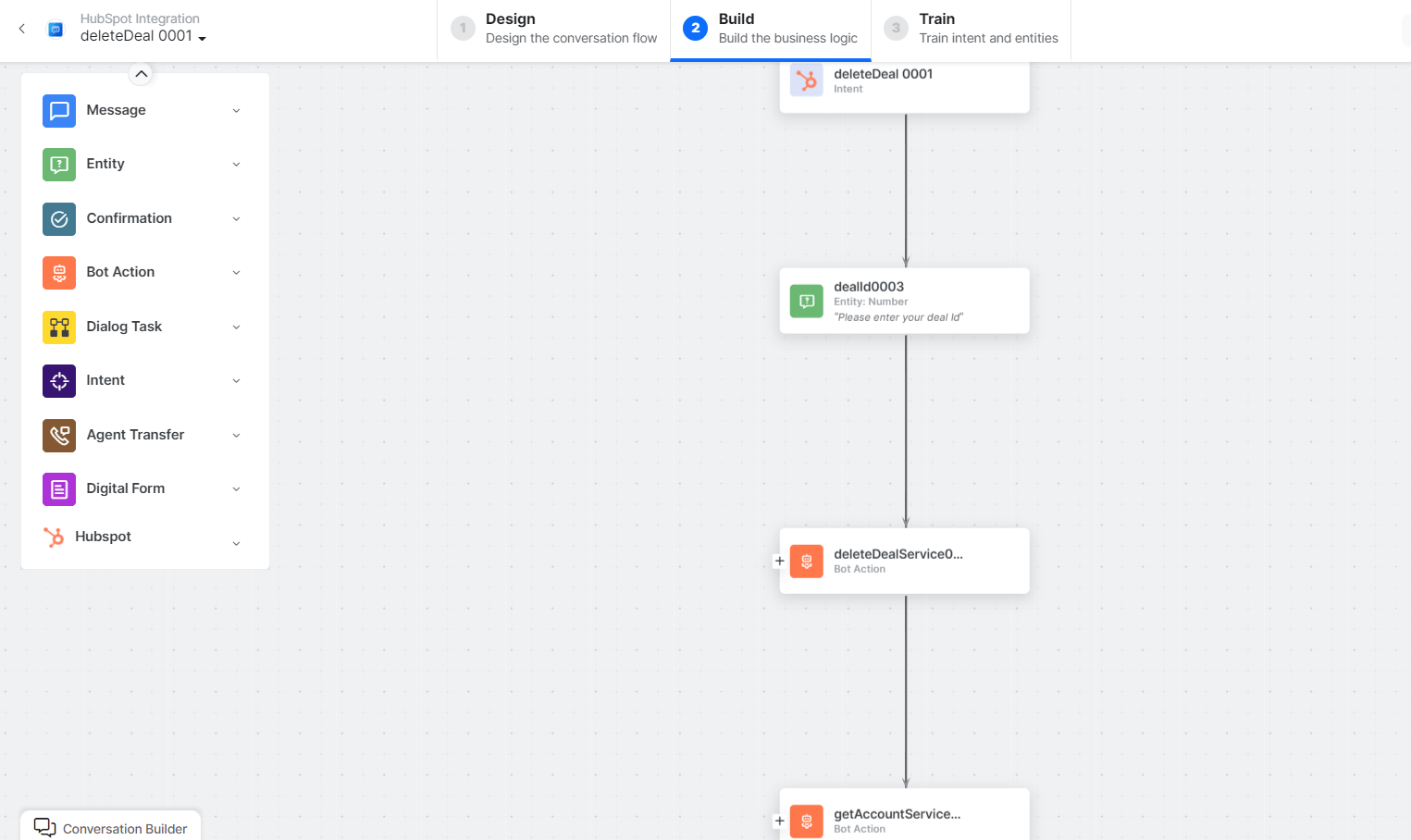 * **Delete Deal** - User intent to delete a deal.
* **DealId** - Entity node for the deal ID.
* **deleteDealService** - Bot action script to delete a deal:
* **Delete Deal** - User intent to delete a deal.
* **DealId** - Entity node for the deal ID.
* **deleteDealService** - Bot action script to delete a deal:
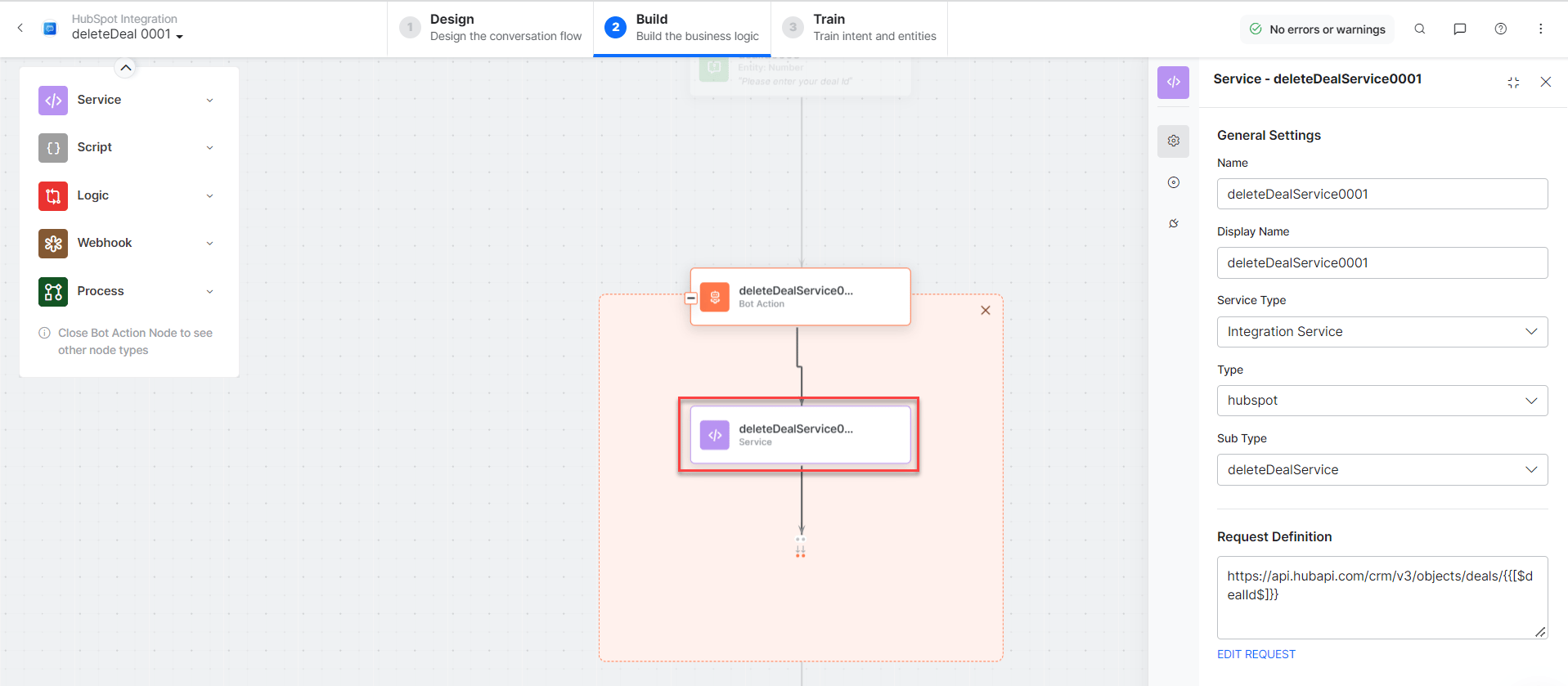 * **getAccountService** - Bot action service to get account details.
* **deleteDealMessage** - Message node to display responses.
3. Click **Train**, then **Talk to Bot** to test:
* **getAccountService** - Bot action service to get account details.
* **deleteDealMessage** - Message node to display responses.
3. Click **Train**, then **Talk to Bot** to test:
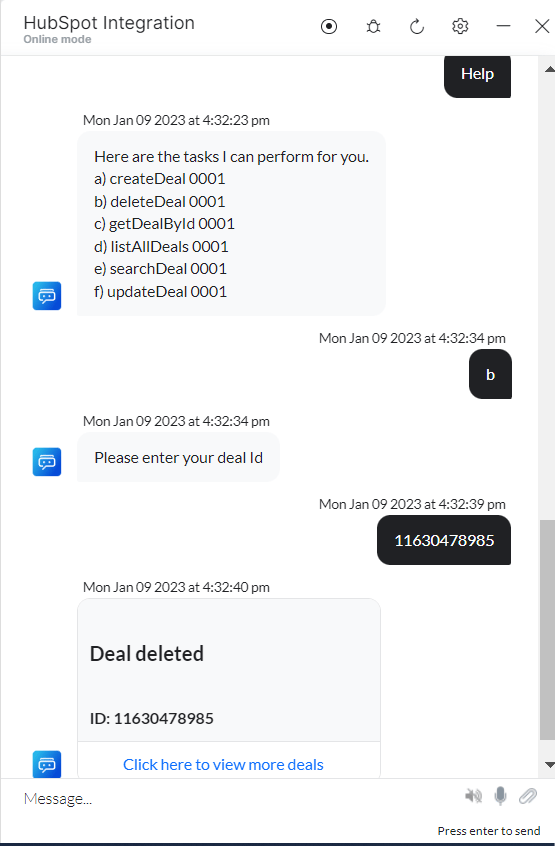 If you enter an incorrect ID, a **404 - No Record Found** error is displayed.
***
### Create a Contact
1. Install the template from [HubSpot Action Templates](/ai-for-service/integrations/actions/configuring-the-hubspot-action#step-2-install-the-hubspot-action-templates).
2. The **Create a Contact** dialog task is added with the following components:
If you enter an incorrect ID, a **404 - No Record Found** error is displayed.
***
### Create a Contact
1. Install the template from [HubSpot Action Templates](/ai-for-service/integrations/actions/configuring-the-hubspot-action#step-2-install-the-hubspot-action-templates).
2. The **Create a Contact** dialog task is added with the following components:
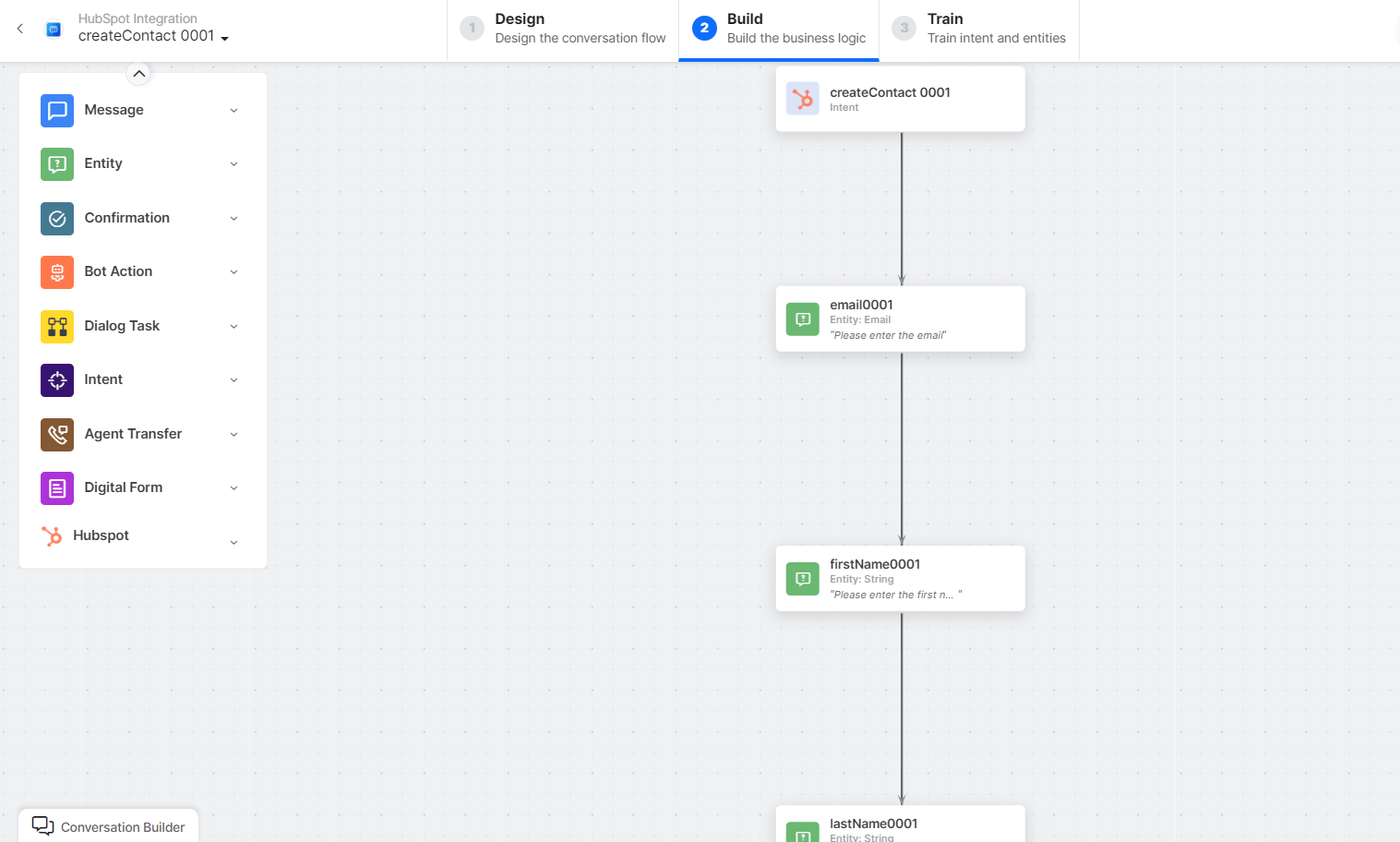 * **createContact** - User intent to create a contact.
* **Email**, **firstName**, **lastName**, **phone** - Entity nodes for contact details.
* **createContactService** - Bot action service to create a contact. Click **Edit Request**:
* **createContact** - User intent to create a contact.
* **Email**, **firstName**, **lastName**, **phone** - Entity nodes for contact details.
* **createContactService** - Bot action service to create a contact. Click **Edit Request**:
 **Sample Request:**
```json theme={null}
{
"properties": {
"email": "harry@abac.com",
"firstname": "Harry",
"lastname": "Anthony",
"phone": "(877) 829-06966777"
}
}
```
Click **+Add Response**:
**Sample Request:**
```json theme={null}
{
"properties": {
"email": "harry@abac.com",
"firstname": "Harry",
"lastname": "Anthony",
"phone": "(877) 829-06966777"
}
}
```
Click **+Add Response**:
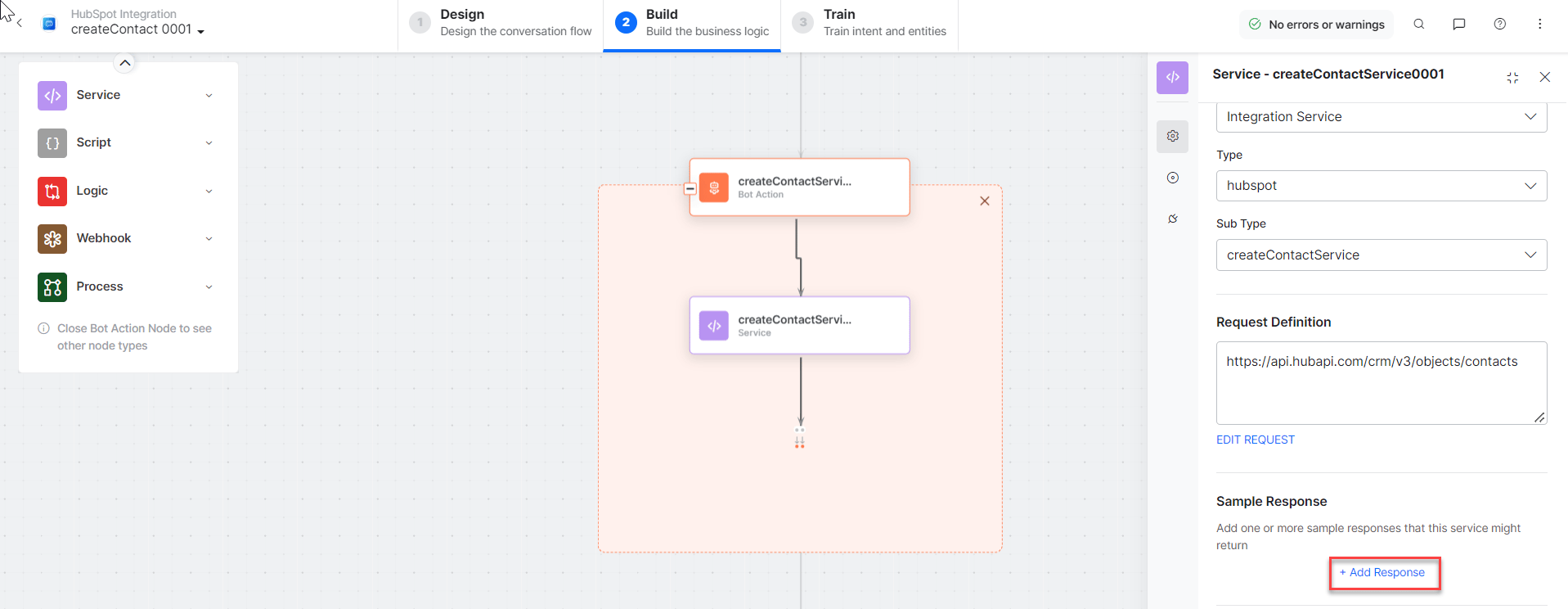 **Sample Response:**
```json theme={null}
{
"id": "1201",
"properties": {
"email": "harry.anthony@abac.com",
"firstname": "harry",
"lastname": "anthony",
"lifecyclestage": "lead"
},
"createdAt": "2022-09-21T05:54:29.872Z",
"archived": false
}
```
* **getAccountService** - Bot action service to get account details.
* **createContactMessage** - Message node to display responses.
3. Click **Train**, then **Talk to Bot** to test.
***
### Get a Contact by ID
1. Install the template from [HubSpot Action Templates](/ai-for-service/integrations/actions/configuring-the-hubspot-action#step-2-install-the-hubspot-action-templates).
2. The **Get Contact by Id** dialog task is added with the following components:
* **getContact by Id** - User intent to get a contact by ID.
* **contactID** - Entity node for the contact ID.
* **getContactService** - Bot action service to fetch contact. Click **Edit Request**:
**Sample Response:**
```json theme={null}
{
"id": "1201",
"properties": {
"email": "harry.anthony@abac.com",
"firstname": "harry",
"lastname": "anthony",
"lifecyclestage": "lead"
},
"createdAt": "2022-09-21T05:54:29.872Z",
"archived": false
}
```
* **getAccountService** - Bot action service to get account details.
* **createContactMessage** - Message node to display responses.
3. Click **Train**, then **Talk to Bot** to test.
***
### Get a Contact by ID
1. Install the template from [HubSpot Action Templates](/ai-for-service/integrations/actions/configuring-the-hubspot-action#step-2-install-the-hubspot-action-templates).
2. The **Get Contact by Id** dialog task is added with the following components:
* **getContact by Id** - User intent to get a contact by ID.
* **contactID** - Entity node for the contact ID.
* **getContactService** - Bot action service to fetch contact. Click **Edit Request**:
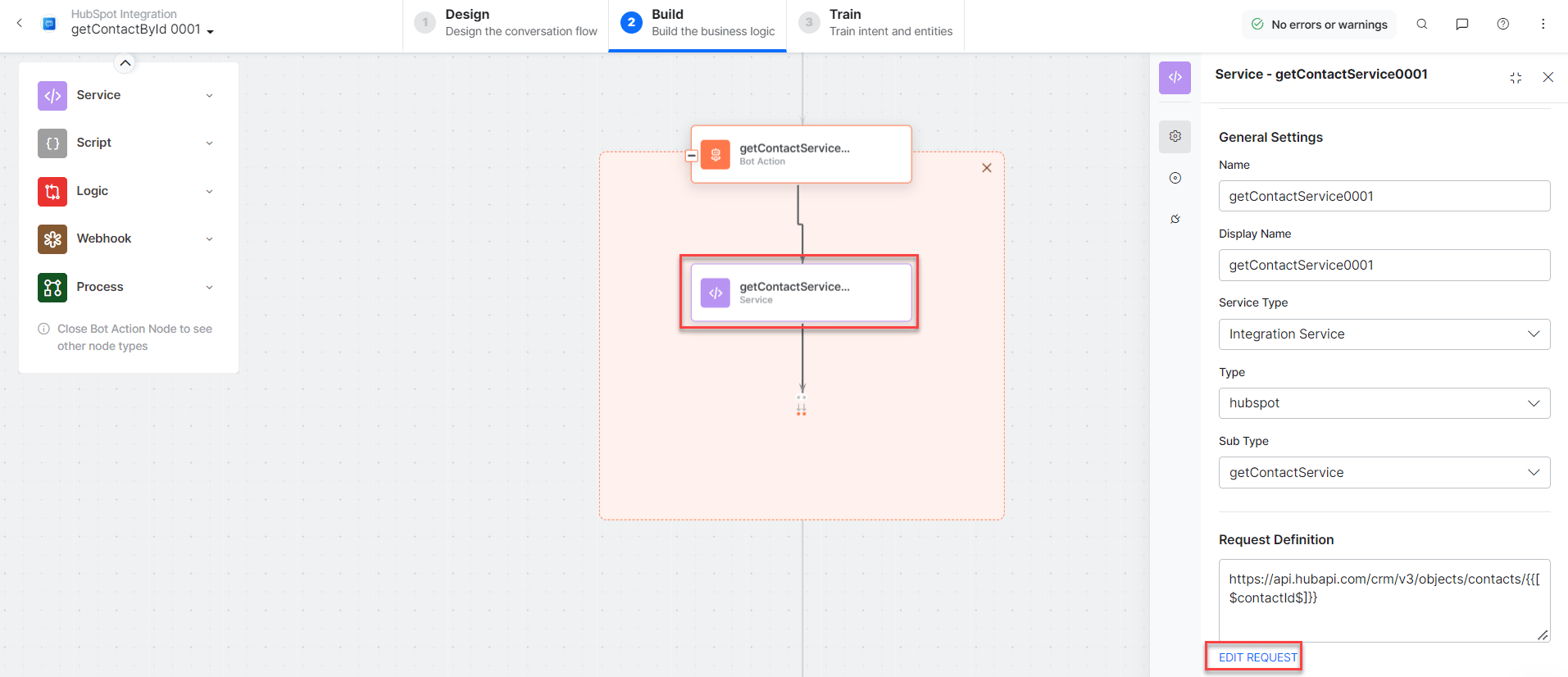 * Click **+Add Response**:
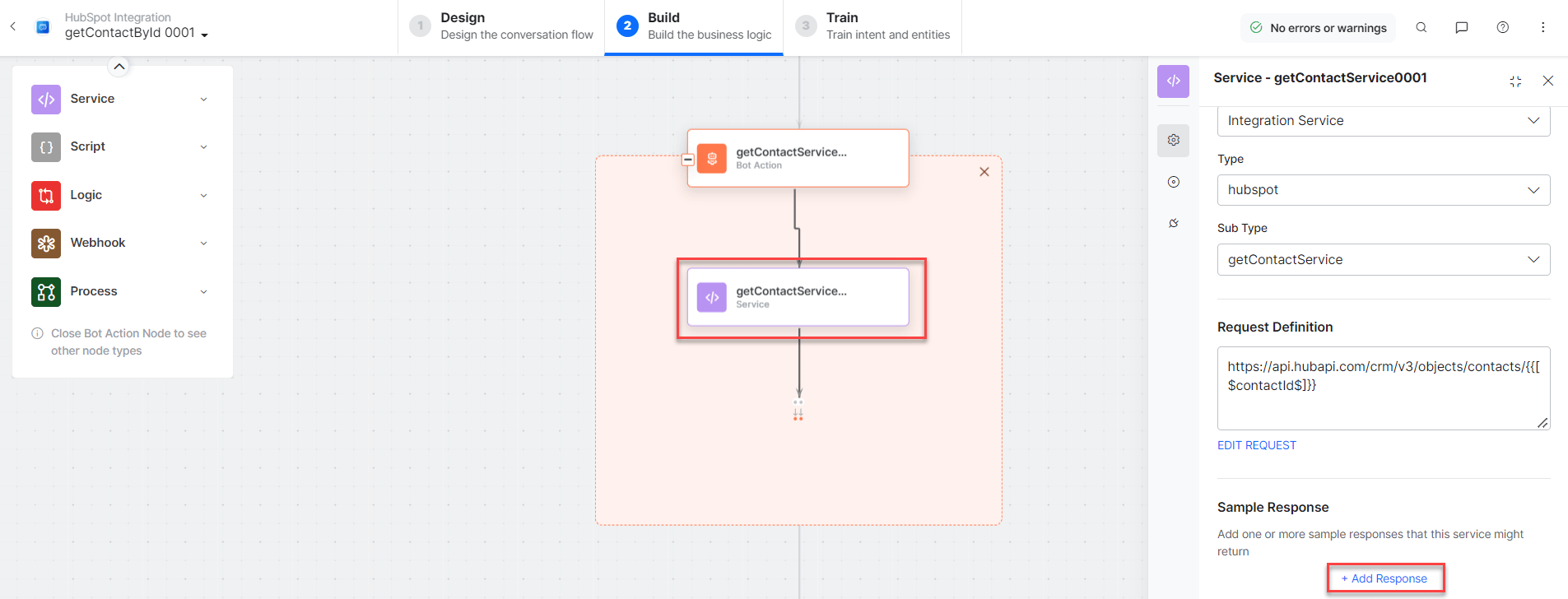 **Sample Response:**
```json theme={null}
{
"id": "1201",
"properties": {
"email": "harry.anthony@abac.com",
"firstname": "harry",
"lastname": "anthony"
},
"createdAt": "2022-09-21T05:54:29.872Z",
"archived": false
}
```
* **getAccountService** - Bot action service to get account details.
* **getContactMessage** - Message node to display responses.
3. Click **Train**, then **Talk to Bot** to test.
***
### List All Contacts
1. Install the template from [HubSpot Action Templates](/ai-for-service/integrations/actions/configuring-the-hubspot-action#step-2-install-the-hubspot-action-templates).
2. The **List All Contacts** dialog task is added with the following components:
**Sample Response:**
```json theme={null}
{
"id": "1201",
"properties": {
"email": "harry.anthony@abac.com",
"firstname": "harry",
"lastname": "anthony"
},
"createdAt": "2022-09-21T05:54:29.872Z",
"archived": false
}
```
* **getAccountService** - Bot action service to get account details.
* **getContactMessage** - Message node to display responses.
3. Click **Train**, then **Talk to Bot** to test.
***
### List All Contacts
1. Install the template from [HubSpot Action Templates](/ai-for-service/integrations/actions/configuring-the-hubspot-action#step-2-install-the-hubspot-action-templates).
2. The **List All Contacts** dialog task is added with the following components:
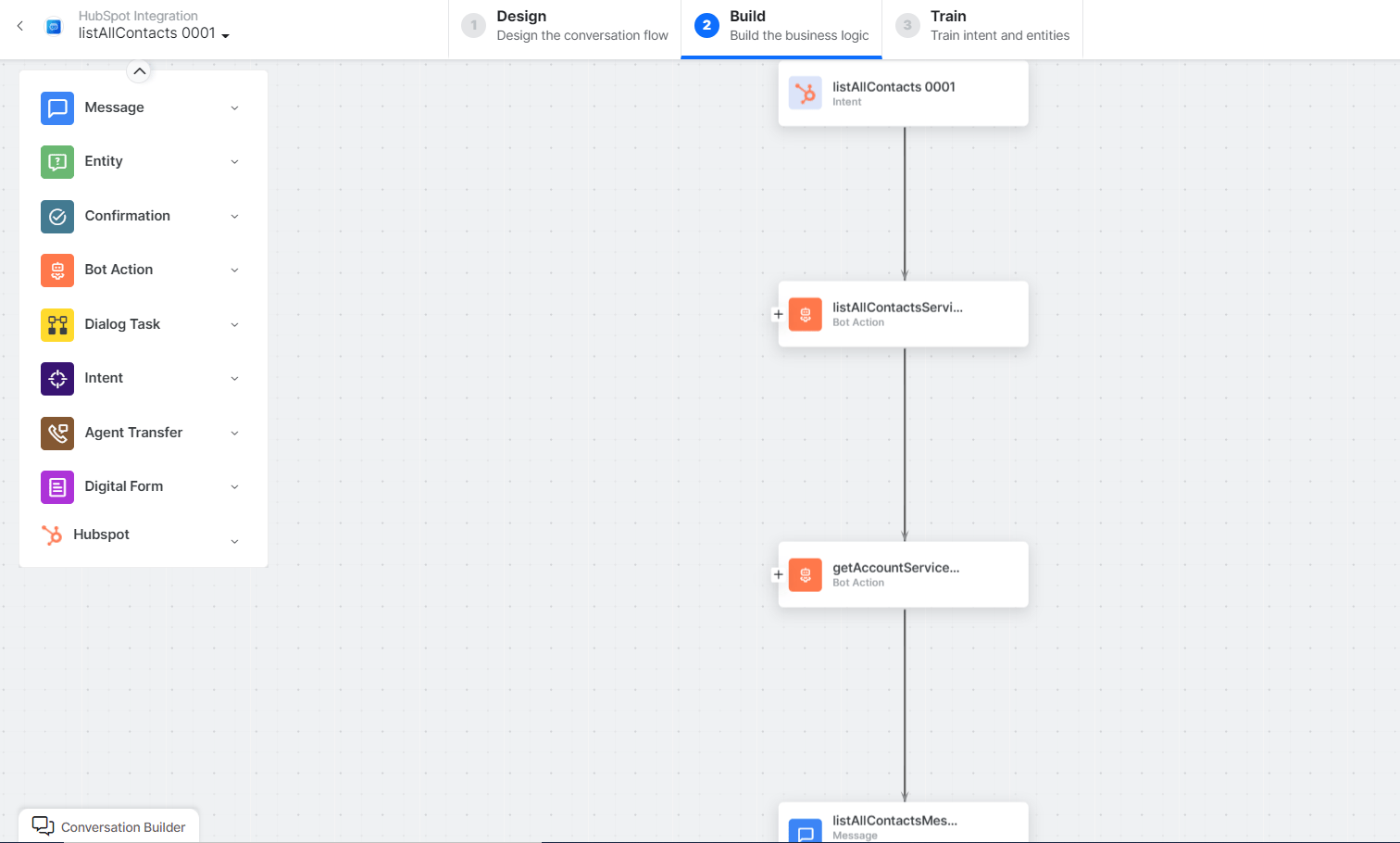 * **List All Contacts** - User intent to list all contacts.
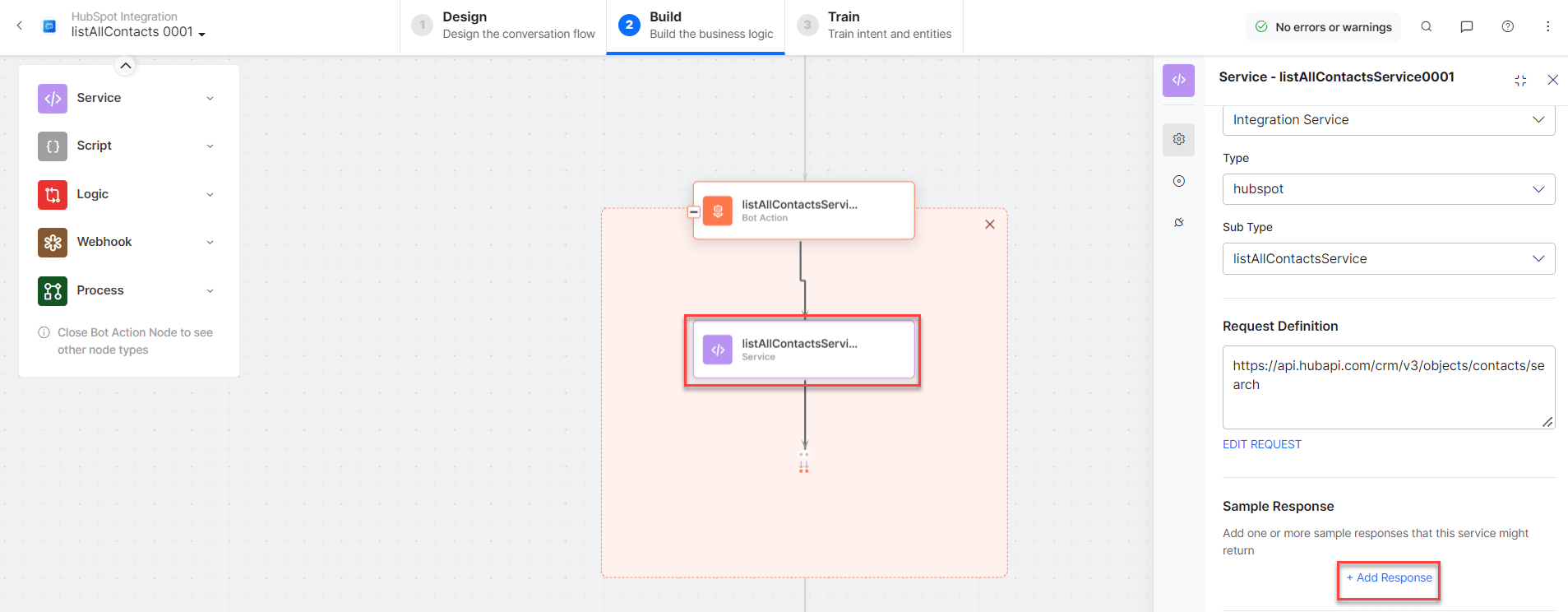
* **listAllContactsService** - Bot action script to view all contacts:
* **List All Contacts** - User intent to list all contacts.
* **listAllContactsService** - Bot action script to view all contacts:
 **Sample Request:**
```json theme={null}
{
"sorts": [{"propertyName": "createdate", "direction": "DESCENDING"}]
}
```
Click **+Add Response**:
**Sample Request:**
```json theme={null}
{
"sorts": [{"propertyName": "createdate", "direction": "DESCENDING"}]
}
```
Click **+Add Response**:
 **Sample Response:** (truncated)
```json theme={null}
{
"total": 6,
"results": [
{
"id": "1401",
"properties": {
"email": "getkgw@zomato.com",
"firstname": "John",
"lastname": "Doe"
},
"archived": false
}
]
}
```
* **getAccountService** - Bot action service to get account details.
* **listAllContactsMessage** - Message node to display responses.
3. Click **Train**, then **Talk to Bot** to test.
***
### Update a Contact
1. Install the template from [HubSpot Action Templates](/ai-for-service/integrations/actions/configuring-the-hubspot-action#step-2-install-the-hubspot-action-templates).
2. The **Update a Contact** dialog task is added with the following components:
**Sample Response:** (truncated)
```json theme={null}
{
"total": 6,
"results": [
{
"id": "1401",
"properties": {
"email": "getkgw@zomato.com",
"firstname": "John",
"lastname": "Doe"
},
"archived": false
}
]
}
```
* **getAccountService** - Bot action service to get account details.
* **listAllContactsMessage** - Message node to display responses.
3. Click **Train**, then **Talk to Bot** to test.
***
### Update a Contact
1. Install the template from [HubSpot Action Templates](/ai-for-service/integrations/actions/configuring-the-hubspot-action#step-2-install-the-hubspot-action-templates).
2. The **Update a Contact** dialog task is added with the following components:
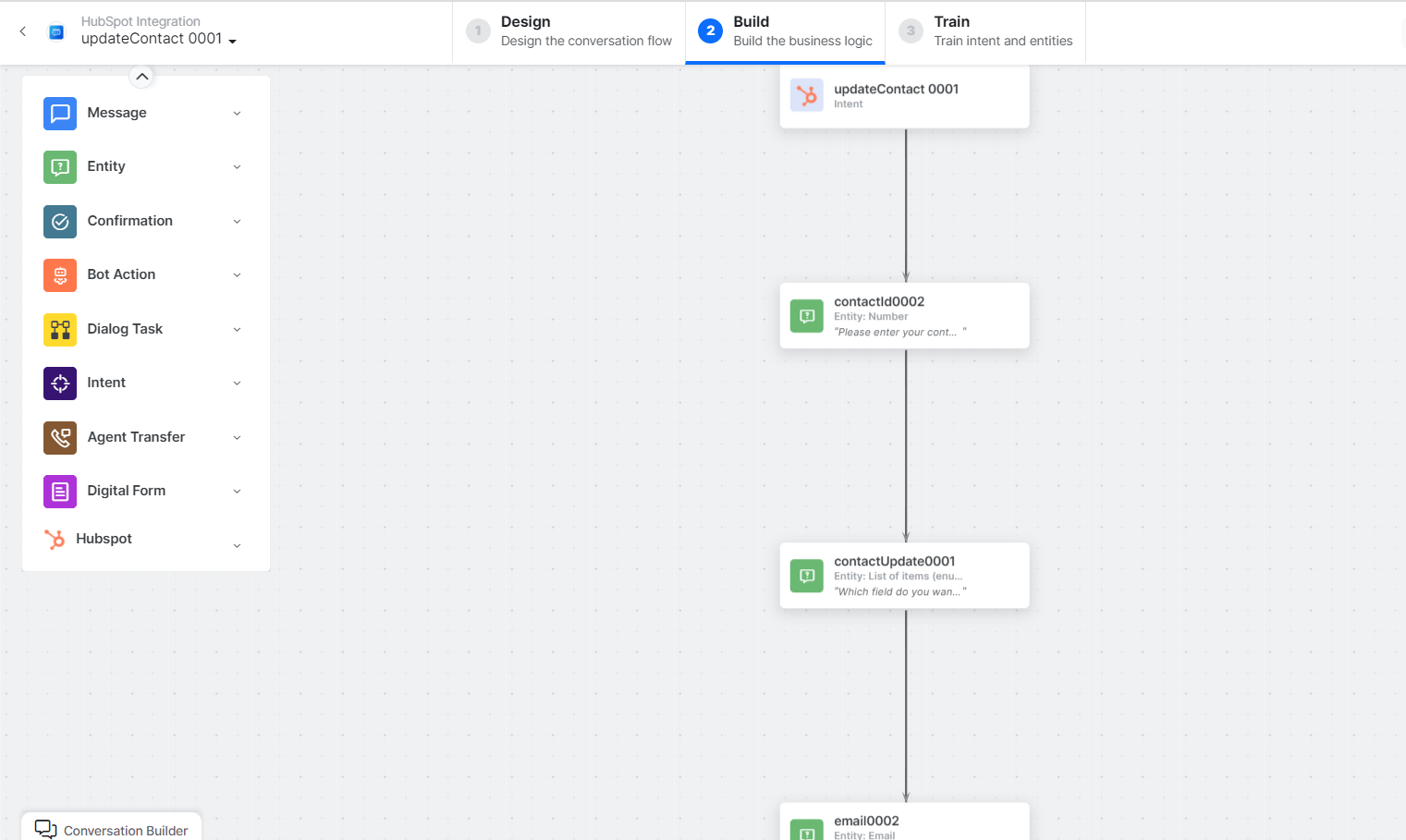 * **UpdateContact** - User intent to update a contact.
* **contactId**, **contactUpdate**, **email**, **firstName**, **lastName**, **phone** - Entity nodes.
* **updateContactScript** - Bot action script to update contact.
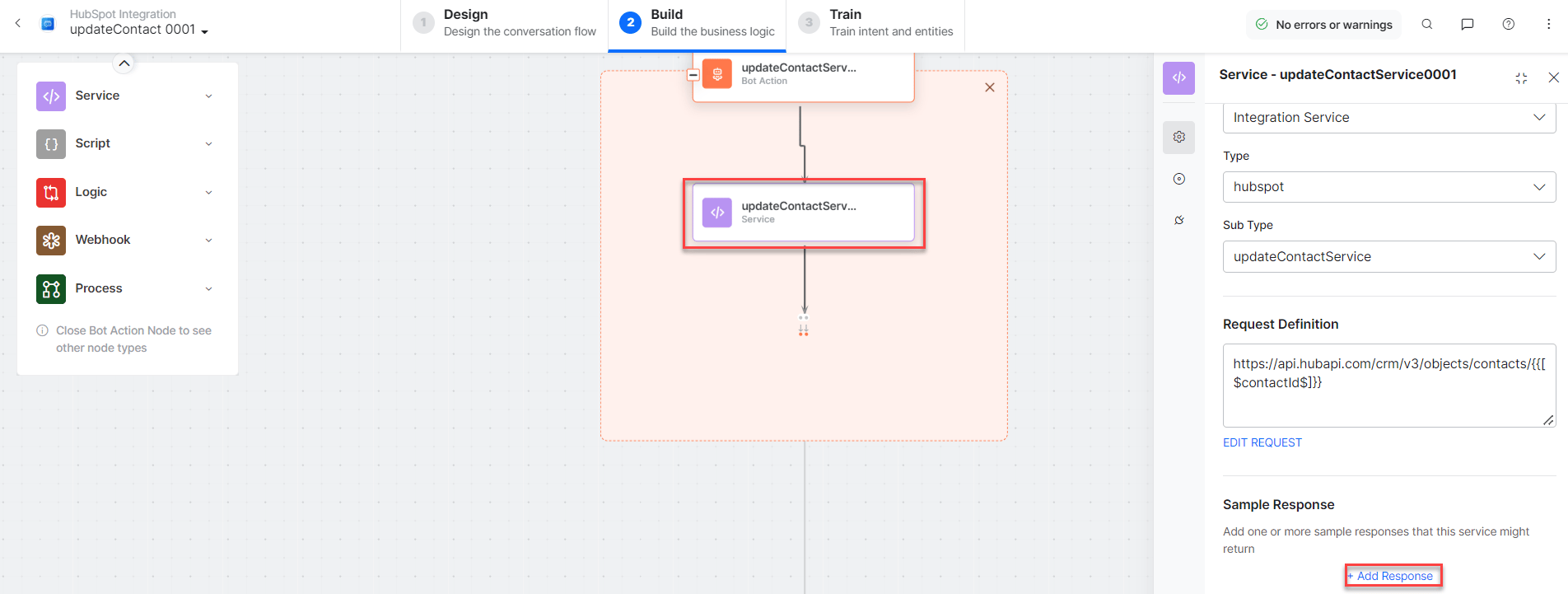
* **updateContactService** - Bot action service to update contact:
* **UpdateContact** - User intent to update a contact.
* **contactId**, **contactUpdate**, **email**, **firstName**, **lastName**, **phone** - Entity nodes.
* **updateContactScript** - Bot action script to update contact.
* **updateContactService** - Bot action service to update contact:
 **Sample Request:**
```json theme={null}
{
"properties": {
"email": "harry.anthony@abac.com"
}
}
```
Click **+Add Response**:
**Sample Request:**
```json theme={null}
{
"properties": {
"email": "harry.anthony@abac.com"
}
}
```
Click **+Add Response**:
 **Sample Response:**
```json theme={null}
{
"id": "1201",
"properties": {
"email": "harry.anthony@abac.com",
"lastmodifieddate": "2022-09-21T06:18:56.655Z"
},
"updatedAt": "2022-09-21T06:18:56.655Z",
"archived": false
}
```
* **getAccountService**, **getContactService** - Bot action services.
* **updateContactMessage** - Message node to display responses.
3. Click **Train**, then **Talk to Bot** to test.
***
### Search Contact by Keyword
1. Install the template from [HubSpot Action Templates](/ai-for-service/integrations/actions/configuring-the-hubspot-action#step-2-install-the-hubspot-action-templates).
2. The **Search Contact by Keyword** dialog task is added with the following components:
**Sample Response:**
```json theme={null}
{
"id": "1201",
"properties": {
"email": "harry.anthony@abac.com",
"lastmodifieddate": "2022-09-21T06:18:56.655Z"
},
"updatedAt": "2022-09-21T06:18:56.655Z",
"archived": false
}
```
* **getAccountService**, **getContactService** - Bot action services.
* **updateContactMessage** - Message node to display responses.
3. Click **Train**, then **Talk to Bot** to test.
***
### Search Contact by Keyword
1. Install the template from [HubSpot Action Templates](/ai-for-service/integrations/actions/configuring-the-hubspot-action#step-2-install-the-hubspot-action-templates).
2. The **Search Contact by Keyword** dialog task is added with the following components:
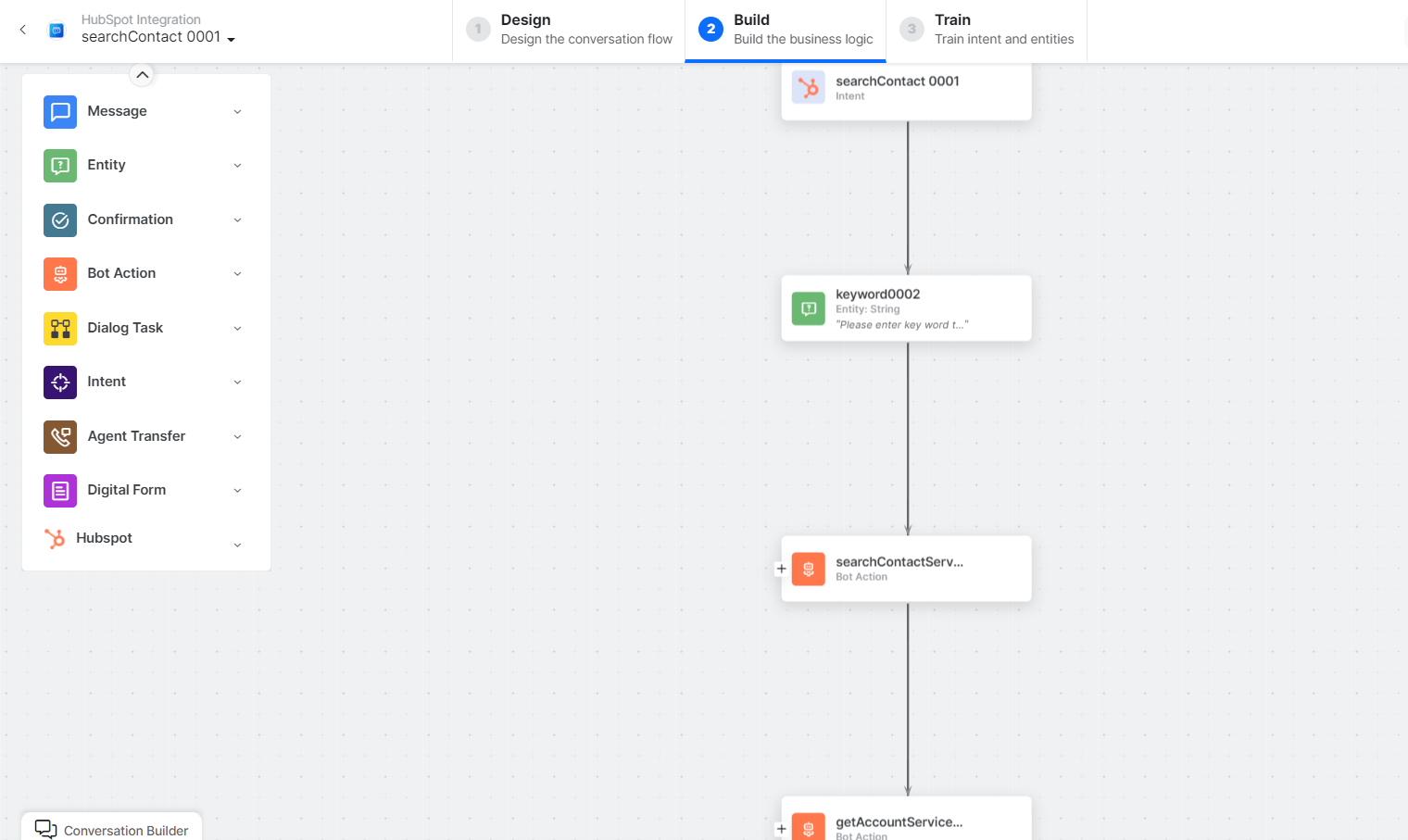 * **Search Contact** - User intent to search a contact.
* **Keyword** - Entity node for search keywords.
* **searchContactService** - Bot action script to search contacts:
* **Search Contact** - User intent to search a contact.
* **Keyword** - Entity node for search keywords.
* **searchContactService** - Bot action script to search contacts:
 **Sample Request:**
```json theme={null}
{
"sorts": [{"propertyName": "createdate", "direction": "DESCENDING"}],
"query": "abac"
}
```
**Sample Response:**
```json theme={null}
{
"total": 1,
"results": [
{
"id": "1201",
"properties": {
"email": "john.doe@example.com",
"firstname": "Work",
"lastname": "Assist"
},
"archived": false
}
]
}
```
* **getAccountService** - Bot action service to get account details.
* **searchContactMessage** - Message node to display responses.
3. Click **Train**, then **Talk to Bot** to test.
***
### Delete a Contact
1. Install the template from [HubSpot Action Templates](/ai-for-service/integrations/actions/configuring-the-hubspot-action#step-2-install-the-hubspot-action-templates).
2. The **Delete Contact** dialog task is added with the following components:
**Sample Request:**
```json theme={null}
{
"sorts": [{"propertyName": "createdate", "direction": "DESCENDING"}],
"query": "abac"
}
```
**Sample Response:**
```json theme={null}
{
"total": 1,
"results": [
{
"id": "1201",
"properties": {
"email": "john.doe@example.com",
"firstname": "Work",
"lastname": "Assist"
},
"archived": false
}
]
}
```
* **getAccountService** - Bot action service to get account details.
* **searchContactMessage** - Message node to display responses.
3. Click **Train**, then **Talk to Bot** to test.
***
### Delete a Contact
1. Install the template from [HubSpot Action Templates](/ai-for-service/integrations/actions/configuring-the-hubspot-action#step-2-install-the-hubspot-action-templates).
2. The **Delete Contact** dialog task is added with the following components:
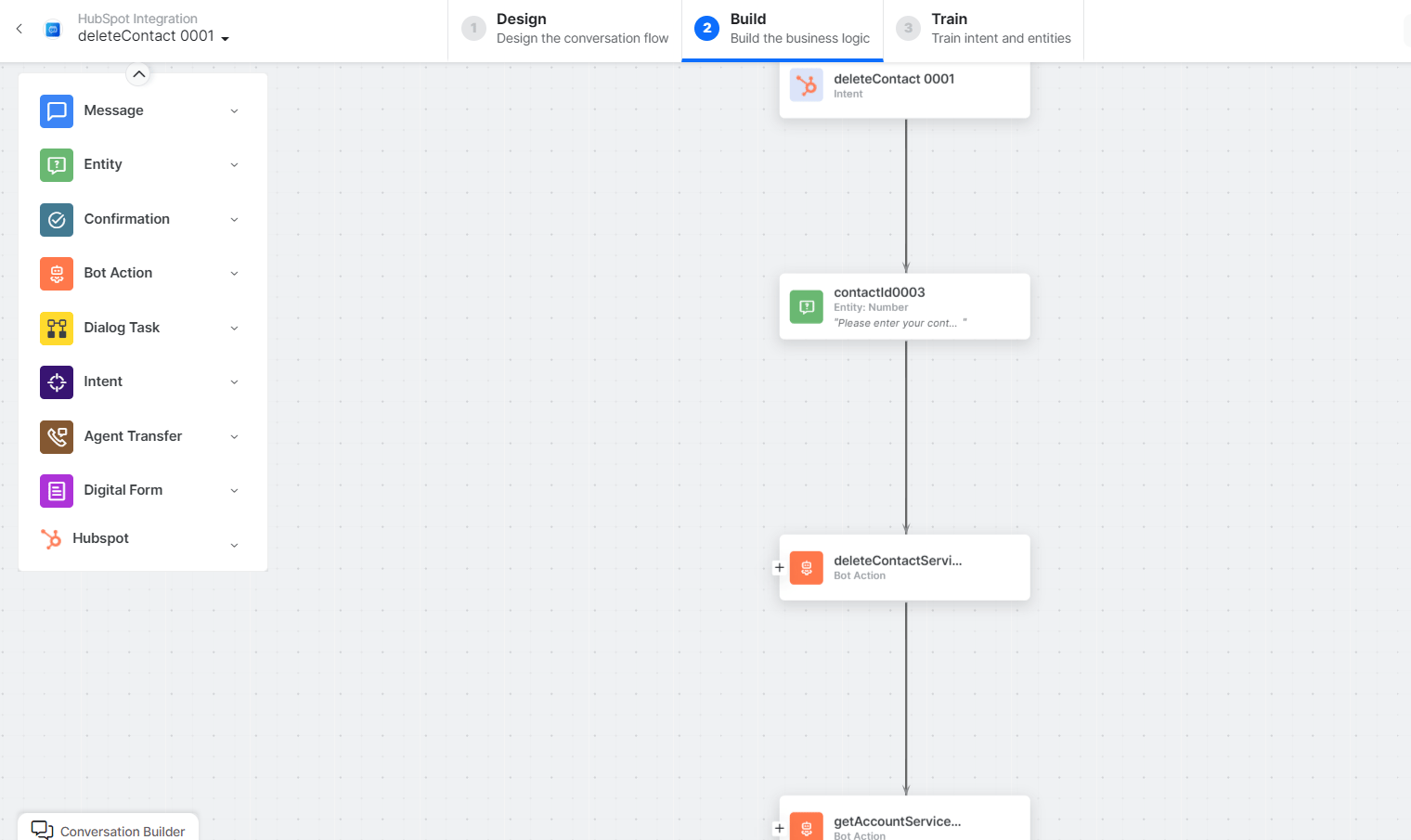 * **Delete Contact** - User intent to delete a contact.
* **ContactId** - Entity node for the contact ID.
* **deleteContactService** - Bot action script to delete a contact:
* **Delete Contact** - User intent to delete a contact.
* **ContactId** - Entity node for the contact ID.
* **deleteContactService** - Bot action script to delete a contact:
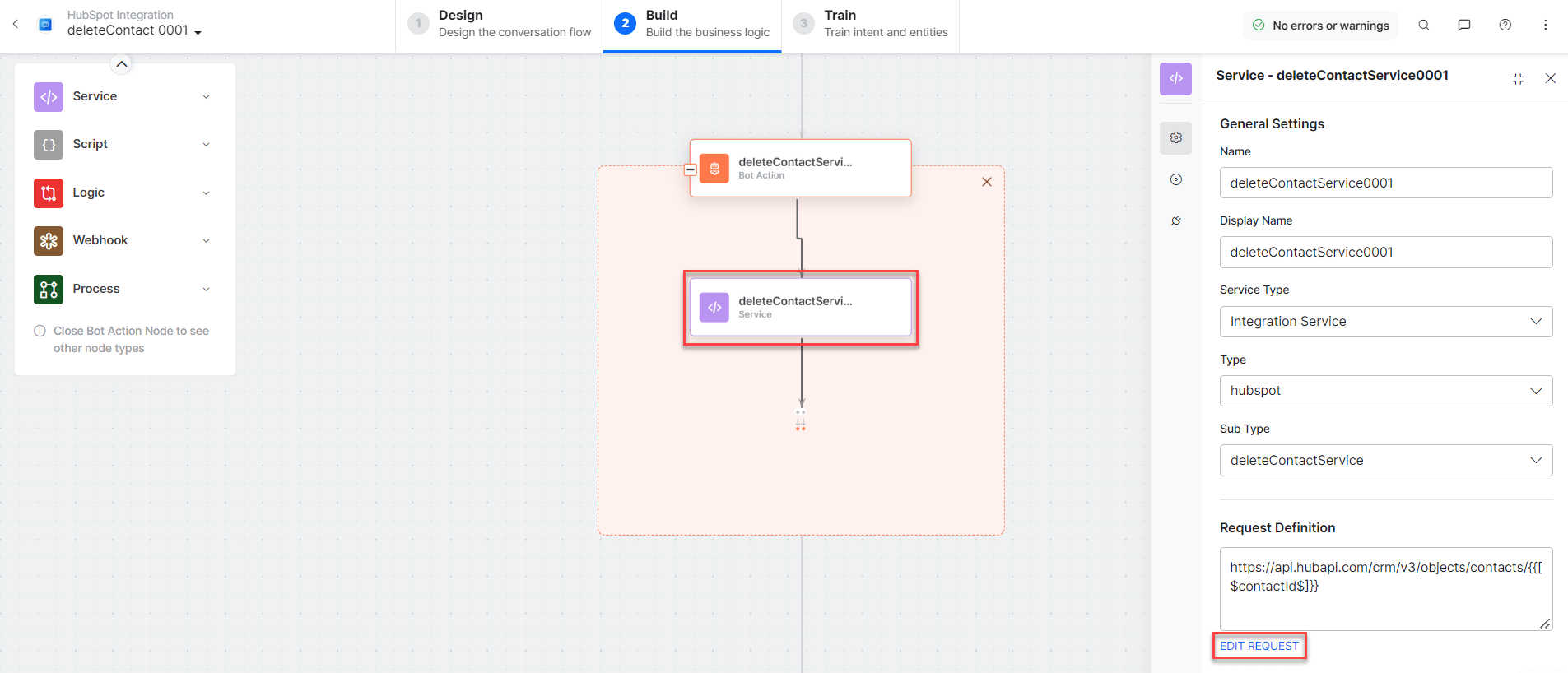 * **getAccountService** - Bot action service to get account details.
* **deleteContactMessage** - Message node to display responses.
3. Click **Train**, then **Talk to Bot** to test.
If you enter an incorrect ID, a **404 - No Record Found** error is displayed.
* **getAccountService** - Bot action service to get account details.
* **deleteContactMessage** - Message node to display responses.
3. Click **Train**, then **Talk to Bot** to test.
If you enter an incorrect ID, a **404 - No Record Found** error is displayed.