

- Human Agent: Evaluates Human Agent interactions routed through contact center queues. Assign forms to queues and use Human Agent-compatible capabilities, including dispute workflows and supported speech-based evaluation metrics. Native CCAI voice calls with agent-to-agent consults are also evaluated automatically, with each metric evaluated on the applicable part of the interaction. The agent who closes the call determines the evaluation form. Metrics with no applicable event or segment are treated as Not Applicable (N/A) according to existing rules.
- AI Agent: Evaluates AI Agent interactions handled by Automation AI Experience Flows. Assign forms to Experience Flows and use AI Agent-compatible evaluation metrics. AI Agent forms don’t support Human Agent capabilities such as dispute workflows or speech-based evaluation metrics.
Select the assignment type when creating the evaluation form. You can’t change the assignment type after the form is created. Assign each form to either Queues (Human Agent) or Experience Flows (AI Agent), not both.
Supported Conversation Types
Evaluation Forms support the following conversation types:- Human Agent conversations: Evaluated using Human Agent evaluation forms assigned to contact center queues.
- AI Agent conversations: Evaluated using AI Agent evaluation forms assigned to Automation AI Experience Flows.
- AI Agent-to-Human Agent handoff conversations: The system evaluates AI Agent and Human Agent segments using the applicable evaluation workflows and capabilities.
- CCAI Voice Calls with Agent-to-Agent Consults: Evaluated using Human Agent evaluation forms. Consult calls are no longer skipped. Applicable metrics are evaluated using the relevant customer-facing, consult, hold, and transfer portions of the interaction.
Key Capabilities
Evaluation Forms Structure
Defines the overall configuration of an evaluation form.Access Evaluation Forms
Navigate to Quality AI > Configure > Evaluation Forms. .
.
Evaluation Forms List
The Evaluation Forms page displays the following list: To create AI Agent evaluation forms, also enable the Automation AI Conversation Source.
Evaluation Processing
For conversations that transfer between an AI Agent and a Human Agent, By Question metrics can evaluate transcript context across both conversation segments. This provides additional context for AI-based evaluation while each conversation segment continues to use its own assigned Evaluation Form. This behavior applies only to supported By Question metrics.Not Applicable Behavior
When a metric requires a segment that isn’t present, the metric is marked Not Applicable rather than Not Adhered. The configured Not Applicable Scoring Treatment is then used when calculating the relevant scores. For example, if an agent consults another agent but doesn’t transfer the call, a By Transfer metric is marked Not Applicable.Create a New Evaluation Form
Evaluation Form creation consists of three or four steps depending on the selected assignment type.- Human Agent evaluation forms include General Settings, Assignments, Evaluation Metrics, and Advanced Settings.
- AI Agent evaluation forms include General Settings, Assignments, and Evaluation Metrics.
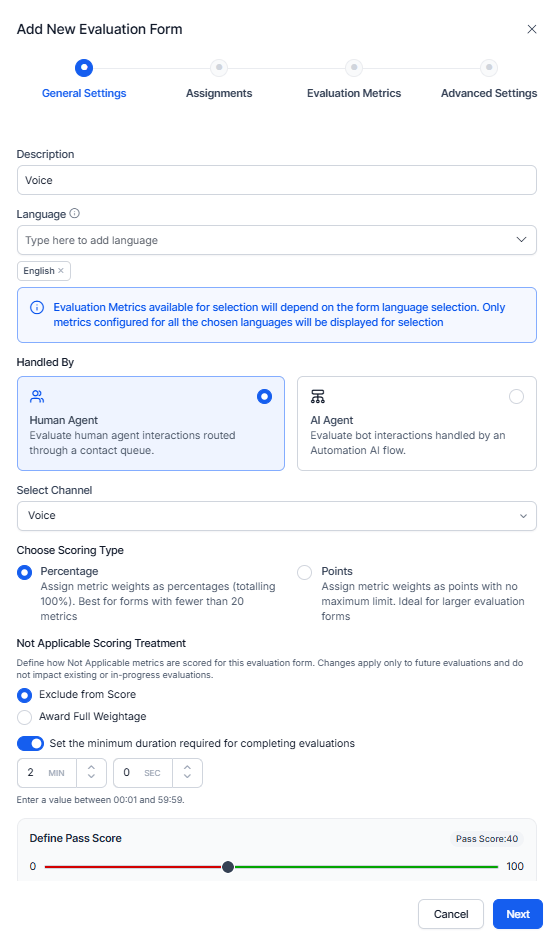
Configure General Settings
- Select the Evaluation Forms tab.
- Select + New Evaluation Forms.
-
Enter the following details:
- Name: Enter a name for the evaluation form.
- Description: Enter a description (optional).
- Language: Select one or more supported languages.
-
Select a Handled By agent to assign a queue name:
- Human Agent (Human Agent forms): Creates an evaluation form for Human Agent conversations using supported evaluation workflows.
- AI Agent (Experience Flow name): Creates an evaluation configuration for AI Agent conversations using supported evaluation capabilities.
-
Select a Channel type:
- Chat: Displays only chat metrics (excluding speech and voice-specific Playbook metrics).
- Voice: Displays all applicable voice metrics, including speech and Playbook metrics.
-
Select a Scoring Type:
- Percentage: Calculates scores based on configured metric weightages.
- Points: Calculates scores based on assigned metric points.
-
Select a Not Applicable Scoring Treatment to define how Not Applicable (N/A) metrics affect the final evaluation score for future evaluations only.
- Exclude from Score (default): Excludes the N/A metric from score calculation by removing its weightage from both the numerator and denominator. The metric doesn’t contribute to the final score.
- Award Full Weightage: Includes the N/A metric’s configured weightage in both the numerator and denominator, awarding full marks while the metric outcome remains Not Applicable.
- (Optional) Set the minimum interaction duration required for evaluation by entering values in MIN and SEC. The system excludes conversations below the configured threshold from evaluation scoring.
- Set a minimum Pass Score required for agents.
-
Select Next.
Assignment Requirements
The selected Handled By type determines the available configuration options. Human Agent forms require queue assignments, while AI Agent forms require Automation AI Experience Flow assignments. For Human Agent forms, assign at least one queue before proceeding. The selected Contact Direction determines which interaction types the system evaluates for the assigned queues.- Changes to Not Applicable Scoring Treatment apply only to future evaluations created with the updated evaluation form version. Existing evaluations retain the scoring behavior configured when they were created.
- Not Applicable Scoring Treatment applies consistently to both AutoQA and manual supervisor audit scores across all metric types and versions.
- Attribute and scorecard scoring are configured separately at the Agent Scorecard level.
Configure Assignments
For Handled By = Human Agent, assign the evaluation form to one or more contact center Queues. Configure Contact Direction and Conversation Source for each queue.Human Agent Assignments
- In the Queues section, select Search Queues to Add and search for the required queues.
-
Select the required queues. Use the following options to manage queue selection:
- Select all: Selects all queues displayed in the queue selection list.
- Clear: Clears all selected queues.
- Select Add to add the selected queues to the assignment table.
- Configure Contact Direction as Inbound, Outbound, or both for the assigned queues.
-
Configure the applicable Conversation Source, such as Contact Center AI (CCAI), AgentAI, or Quality AI Express.
The bulk actions apply only to the selected queue rows. This enables you to configure Contact Direction or remove multiple queues without updating each queue individually.
-
To configure Contact Direction for multiple queues, select the required queue rows and use:
- Select Inbound: Selects Inbound for all selected queues.
- Select Outbound: Selects Outbound for all selected queues.
- To remove multiple queue assignments, select the required queue rows and select Delete Selected.
-
Review the queue assignments and select Next.
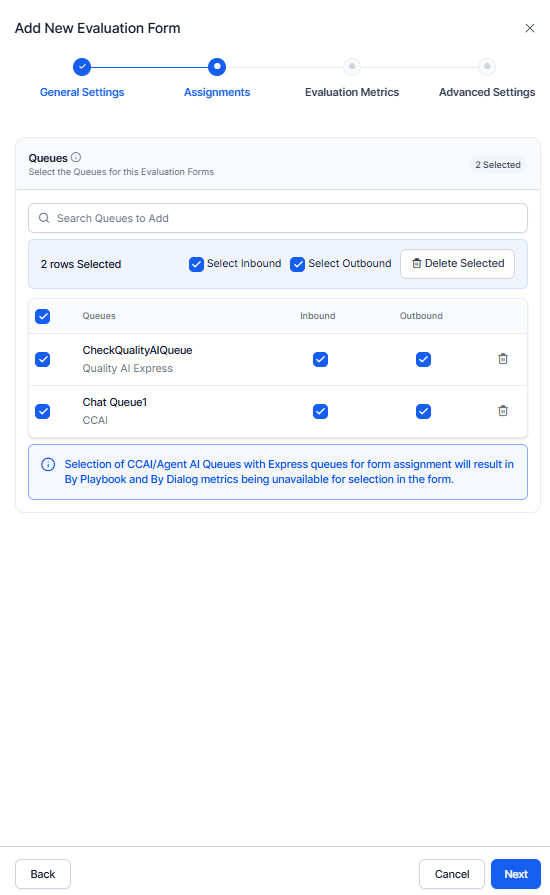
Evaluation metric availability depends on the conversation sources associated with the assigned queues. If an evaluation form includes both CCAI or AgentAI queues and Quality AI Express queues, the By Playbook and By Dialog evaluation metrics are unavailable because these metrics aren’t supported across mixed conversation sources.
AI Agent Assignments
For Handled By = AI Agent, assign the evaluation form to one or more Automation AI Experience Flows.- In the Experience Flow section, select Search Experience Flow to Add and search for the required Experience Flows.
- Select one or more Experience Flows to assign to the evaluation form.
- Review the selected Experience Flows.
-
Select Next.
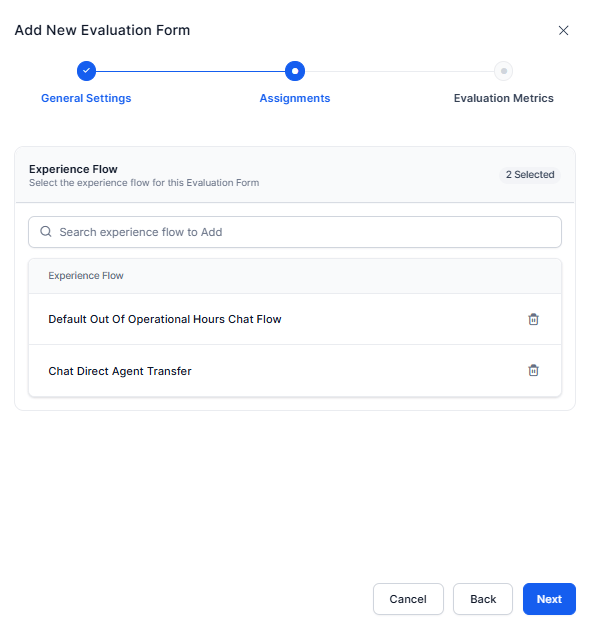
Experience Flows are retrieved from the configured Automation AI environment.
Experience Flow Assignment Rules
Queue Assignment Rules
Bulk queue actions are available for Human Agent evaluation forms. Use Select all, Clear, Select Inbound, Select Outbound, and Delete Selected to manage multiple queue assignments.
AI Agent Assignments
For Handled By = AI Agent, assign the evaluation form to Automation AI Experience Flows. To create AI Agent evaluation forms, you must enable the Automation AI Conversation Source. If Automation AI isn’t enabled, Experience Flow assignments are unavailable, and you can’t assign AI Agent evaluation forms until the required Conversation Source is configured.
- Search and select one or more Experience Flows.
- Review the selected Experience Flows.
- Select Next.
Configure Evaluation Metrics
Evaluation metrics define the criteria used to evaluate interactions for audits and AutoQA scoring. The available metric types depend on the selected Handled By type. Manual metrics require evaluator input, while AI-based metrics evaluate interactions by using the configured AI evaluation method.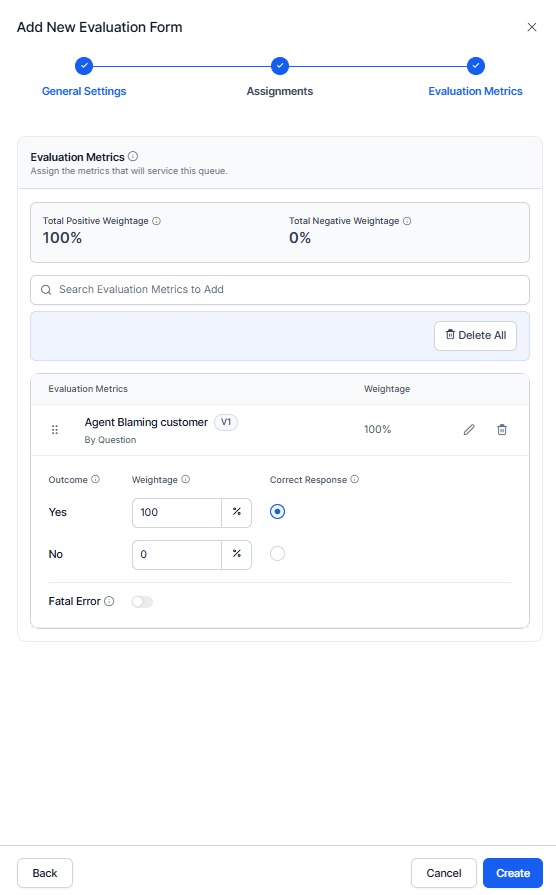
Supported Metric Types
The following table summarizes the evaluation metric types supported for Human Agent and AI Agent evaluation forms.Metric Card Configuration
Configure each metric’s Weightage, Correct Response, and Fatal Error behavior based on whether you enable Trigger Scoring. Configure negative scoring only at the outcome level.
Configure Dispute Allocation (Human Agents Only)
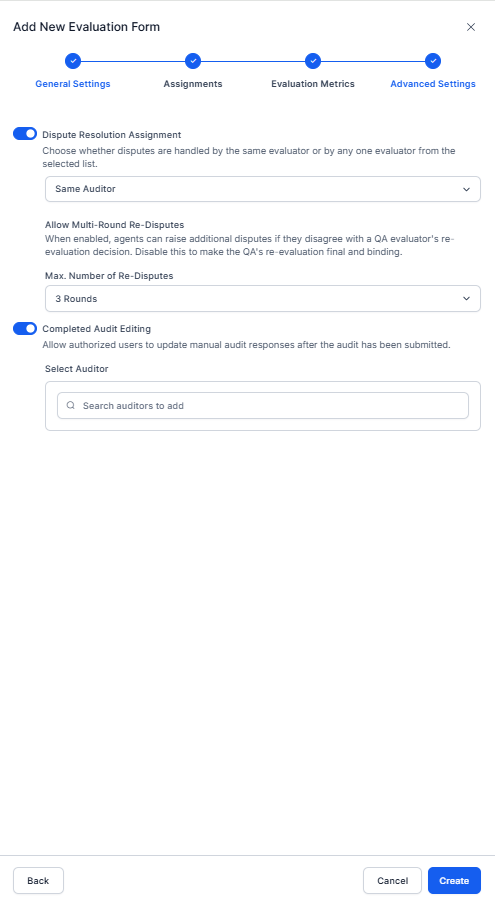
Dispute Resolution Assignment
- Turn on Dispute Resolution Assignment.
- Select a dispute routing option:
- Same Auditor: Routes disputes to the original evaluator.
- Different Auditor: Routes disputes to another QA evaluator from the selected auditor list.
- If you select Different Auditor, search for and select one or more auditors to handle disputes.
- Turn on Allow Multi-Round Re-Disputes to let agents raise additional disputes if they disagree with a QA evaluator’s re-evaluation decision. Turn off this option to make the QA evaluator’s re-evaluation final.
- Select Max Number of Re-Disputes to define the maximum number of additional dispute rounds allowed after re-evaluation.
If Dispute Resolution Assignment is turned off, agents can’t acknowledge or dispute completed evaluations.
Completed Audit Editing
- Turn on Completed Audit Editing to let authorized users update manual audit responses after submitting an audit.
- Under Select Auditor, select one or more auditors authorized to edit completed audits.
- Select Create to save the configuration.
Metric Rules
- The combined positive weightage must equal 100% for percentage-based scoring.
- Configure the expected response and score for every metric.
- Human Agent forms support all available metric types, and Fatal Error settings apply only to supported metrics.
- AI Agent forms support only AI Agent metrics used during Experience Flow evaluations.
Completed Audit Editing enables authorized users to update manual audit responses after an audit is submitted. Re-audits impact the auditor score and are recorded in the trial logs. Edit permissions are based on the users added for form re-audits.
Evaluation Processing
Evaluation Behavior
During evaluation, the system selects the applicable form based on the queue, channel, and contact direction. The system skips conversations without matching assignments. Manual metrics work only with points-based scoring and remain excluded from automated scorecards.AI Agent-to-Human Agent Handoff Evaluation
For conversations that include an AI Agent-to-Human Agent Handoff, each conversation segment is evaluated using its corresponding evaluation form:- AI Agent Segment: Uses the AI Agent evaluation form assigned to the corresponding Experience Flow.
- Human Agent Segment: Uses the Human Agent evaluation form assigned to the corresponding Queue.
Evaluation Form Selection Logic
During evaluation, the system selects the applicable Evaluation Form based on the configured assignment criteria.- Human Agent conversations: The system selects the Evaluation Form based on the assigned Queue, Channel, and Contact Direction. An interaction is eligible for evaluation when it’s associated with a queue that has an active evaluation form matching the configured channel and contact direction.
- AI Agent conversations: The system selects the Evaluation Form based on the assigned Automation AI Experience Flow and Channel. An interaction is eligible for evaluation when it’s associated with an Experience Flow that has an active Evaluation Form for the configured channel.
Contact Duration Evaluation
The system evaluates contact duration before scoring. Threshold updates apply only to future interactions. A contact may qualify for one evaluation form but not another.
Scoring
Scoring Logic
- Pass: Final score ≥ Pass Score threshold
- Fail: Final score < Pass Score threshold
Not Applicable Scoring Treatment
A metric can have a Not Applicable outcome when a Dynamic metric’s trigger condition isn’t met or an auditor manually marks the metric as Not Applicable, or a consult-dependent metric such as By Transfer has no matching segment on a CCAI voice call. Choose one of the following scoring treatments.
Example: A form contains five metrics, each weighted 20 for a total weightage of 100:
- 3 Adhered metrics = 60 weightage
- 1 Not Adhered metric = 20 weightage
- 1 Not Applicable metric = 20 weightage
The system applies this treatment to all metric types and versions for both AutoQA scores and manual supervisor audit scores. The treatment changes only the metric’s weightage contribution. The Not Applicable label, AI justification, and adherence state remain unchanged.
Points-Based Scoring Formula
Kore Evaluation Score calculates the weighted impact of met and not-met metrics, subtracts penalties, divides by total positive weights, and multiplies the result by 100. where,- Myi, Wyi = Adhered metrics and positive points.
- Mni, Wni = Non-adhered metrics and negative points.
Percentage vs. Points Comparison
Quality AI supports two scoring methods.Weight Assignment Rules
Fatal Error Behavior
Fatal error configuration remains the same for both scoring types. When a fatal metric fails, the system sets the final score to 0 and marks the interaction as failed, regardless of other metric scores.Manage Evaluation Forms
Edit a Form
Select Edit from the Evaluation Forms list. You can modify: General Settings, Queue or Experience Flow assignments, Evaluation Metrics, and Dispute Allocation (Human Agent only). Select Update to save changes.Delete a Form
Select Delete from the Evaluation Forms list. Before deleting:- Remove all Queue or Experience Flow assignments.
- Resolve dependent metric or attribute references.